PC Build Specs for Content Creation and Gaming Combined
Balance GPU strength for both gaming and streaming, then prioritize CPU cores for rendering work.

Summary
Balance GPU strength for both gaming and streaming, then prioritize CPU cores for rendering work.
A hybrid gaming-creator build is harder to get right than a pure gaming rig, and the reason comes down to what each workload actually asks of the hardware. Gaming performance is largely dictated by the GPU, especially at higher resolutions, though plenty of titles still lean on single-threaded CPU speed more than people expect. Content creation runs on a different set of priorities entirely: core count, thread count, the amount of RAM available for multitasking, and how fast data moves to and from storage. Video editing, rendering, and streaming can tax the CPU heavily while simultaneously demanding more memory and benefiting from GPU-accelerated encoding, all at once, which is a load profile gaming alone rarely produces. A builder who tries to split a budget evenly down the middle, giving equal weight to both sets of priorities without understanding how they diverge, ends up with a machine that underperforms at both jobs. The goal isn't dividing a budget in half. You need to identify which components genuinely serve both workloads and which ones force a real choice, then spend accordingly.
The GPU drives gaming, and its encoder drives creation
The GPU sits at the center of a hybrid build for a reason that has nothing to do with compromise: it's the one component capable of serving both jobs at a high level, because it drives gaming performance at every resolution tier while also housing the hardware video encoder that determines streaming quality and export speed. That dual role makes GPU selection the single most consequential decision in the whole build, and it has only gotten more consequential as VRAM requirements have climbed. Cards with 8GB of VRAM are increasingly punished at 1440p, and 12GB has become the practical minimum at that resolution. Sixteen gigabytes is the target worth building toward if you want real headroom, and 12GB remains a legitimate, viable baseline at many mid-range price points. That VRAM floor matters twice over in a hybrid build: it governs texture and asset loading in games, and it governs how much project data a creative application can hold in GPU memory before performance degrades.
Each platform's strength depends on which creative tool dominates the workflow. AMD's RX 9070 XT, for instance, trails the RTX 5070 by 8% in DaVinci Resolve's overall benchmark score, and on AI-driven creative workloads it falls behind nearly every modern card on the market, outperforming only the older 6900 XT. That's a meaningful gap for a colorist or an editor leaning on AI-assisted tools, but it says little about gaming performance, where the comparison runs differently. The right way to read a GPU decision for a hybrid build is to ask which specific creative software will run most often, check how that software benchmarks on each card, and weigh that against the gaming performance the reader actually needs at their target resolution. VRAM capacity and encoder quality are the decisive factors.
CPU choice for a hybrid build versus a gaming-only build
Gaming's component hierarchy puts the GPU first and treats the CPU as a supporting choice, since the performance gap between a mid-range CPU and a high-end one is small next to the chasm between a mid-range GPU and a flagship. That's why overspending on the CPU at the GPU's expense is one of the most common mistakes in a gaming-only build. A hybrid build inverts that logic, because rendering, compilation, and other multi-threaded creative work reward raw core count and clock speed in a way gaming rarely does.
AMD's 3D V-Cache chips, the Ryzen 7 9800X3D and its successors, remain the strongest gaming CPUs on the market, but the cache architecture that makes them so dominant in gaming benchmarks helps little once the workload shifts to multi-threaded rendering or compilation. A high-core-count Ryzen 9 or Intel Core Ultra trades away some peak gaming frame rate in exchange for substantially more multi-threaded throughput, a tradeoff no pure gamer should accept but one a hybrid builder needs to weigh seriously. The Ryzen 9 9950X3D is AMD's answer to builders who refuse to choose: it pairs a high core count with 3D V-Cache, though that cache sits on only one of its two compute dies, so half the chip's cores don't benefit from the cache advantage that makes 3D V-Cache chips famous for gaming. It carries a price premium steep enough to make sense only at the enthusiast tier, for a builder who has already decided neither workload gets shortchanged.
Streaming introduces a third demand on top of gaming and editing: encoding a stream in software while a game runs in real time pulls hard on CPU threads continuously, not in the bursts gaming alone produces. An 8-core chip can handle that load, but a 12-core chip handles it with less impact on frame rate and more headroom left over for whatever else is running in the background. The CPU decision in a hybrid build is about deciding how much gaming performance to trade for multi-threaded capacity, based on which creative tasks actually fill the calendar.
RAM and storage needs for creators versus gamers
Thirty-two gigabytes of DDR5 is the practical floor for a hybrid build, not a luxury tier reserved for professionals. A video editor, streaming software, a running game, and the usual pile of background applications will fill 16GB fast and start paging to disk, which quietly destroys render and export performance in ways that can be hard to diagnose after the fact. On the AM5 platform, you tend to get the sweet spot with a mid-range DDR5 speed grade, because it balances the memory bandwidth that benefits both gaming and creative software against a price curve that climbs steeply for marginal gains. Faster kits exist, but they show diminishing returns for most real workloads.
Storage asks a different question of a hybrid build than it does of a gaming rig. A gamer cares about load times, and any fast NVMe drive handles that well. A video editor cares about sustained sequential read and write speed, because scrubbing through footage and exporting large files pushes a drive in a way loading a game never does. A Gen 4 NVMe drive is the practical floor for that kind of work, but if you want every last bit of throughput, PCIe Gen 5 is the enthusiast-tier upgrade. Capacity matters just as much as speed: 2TB is the realistic minimum at the creator tier, since a game library alongside project files and exports fills a drive quickly, and running out of space mid-project is exactly the kind of workflow interruption a modest storage upgrade at build time avoids.
Power supply and cooling requirements for a content-creation workload
Gaming produces bursty loads; rendering and video export produce sustained ones, and that distinction changes what a PSU and cooler need to be built to handle. A CPU that stays comfortably cool through a gaming session can still thermal-throttle during a long render if the cooling and power delivery were sized only for gaming's peaks. PSU sizing should follow GPU tier closely: an RTX 5080-class build calls for a minimum 850W 80+ Gold unit, while a 750W fully modular unit suits the RTX 5070 / Ryzen 9 tier, where combined CPU and GPU draw under load stays meaningfully lower than it does at the flagship end.
Cooling follows a similar logic. Modern dual-tower air coolers, the Thermalright Phantom Spirit and Deepcool AK620 among them, match or exceed entry-level 240mm AIOs on thermal performance while running quietly under load, so air cooling remains a credible option even for demanding builds. Liquid cooling earns its keep specifically under sustained multi-core workloads like rendering, or under extreme overclocking, which is precisely the kind of load a hybrid creator build will see on a regular basis. The practical rule for a hybrid builder is to treat cooling as a creator's purchase rather than a gamer's: budget for a 240mm or 360mm AIO, or a genuinely top-tier dual-tower air cooler, and don't assume the CPU will spend most of its life idling the way it might in a gaming-only machine.
A hybrid build at three price points
The component arguments above point toward a simple rule of thumb: the right build tier for a hybrid machine is almost always one step higher than it would be for a pure gaming rig targeting the same resolution, because the creator workload justifies the extra investment in CPU, RAM, and storage that a gaming-only build could skip. At the entry tier, you pair a 12GB-class GPU with a core count high enough to handle light editing and occasional streaming without choking, build around 32GB of RAM and a Gen 4 NVMe drive at 2TB, and size the PSU and cooler for sustained loads. At the mid tier, the RTX 5070 and a high-core-count Ryzen 9 or Intel Core Ultra chip form a natural pairing, backed by a 750W fully modular PSU and a 240mm or larger AIO, giving real headroom for simultaneous streaming and editing work. At the enthusiast tier, an RTX 5080-class GPU with 16GB of VRAM, an 850W 80+ Gold PSU, and a chip like the Ryzen 9 9950X3D close most of the remaining gap between gaming-first and creation-first priorities, for builders unwilling to compromise on either.
These tiers are frameworks whose right balance within each one still depends on which creative tools dominate a given workflow. Planning tools that let a builder visualize and price a configuration before buying, rather than guessing from a spec sheet, make it far easier to see where a given budget actually lands across these tiers.
What real builders own
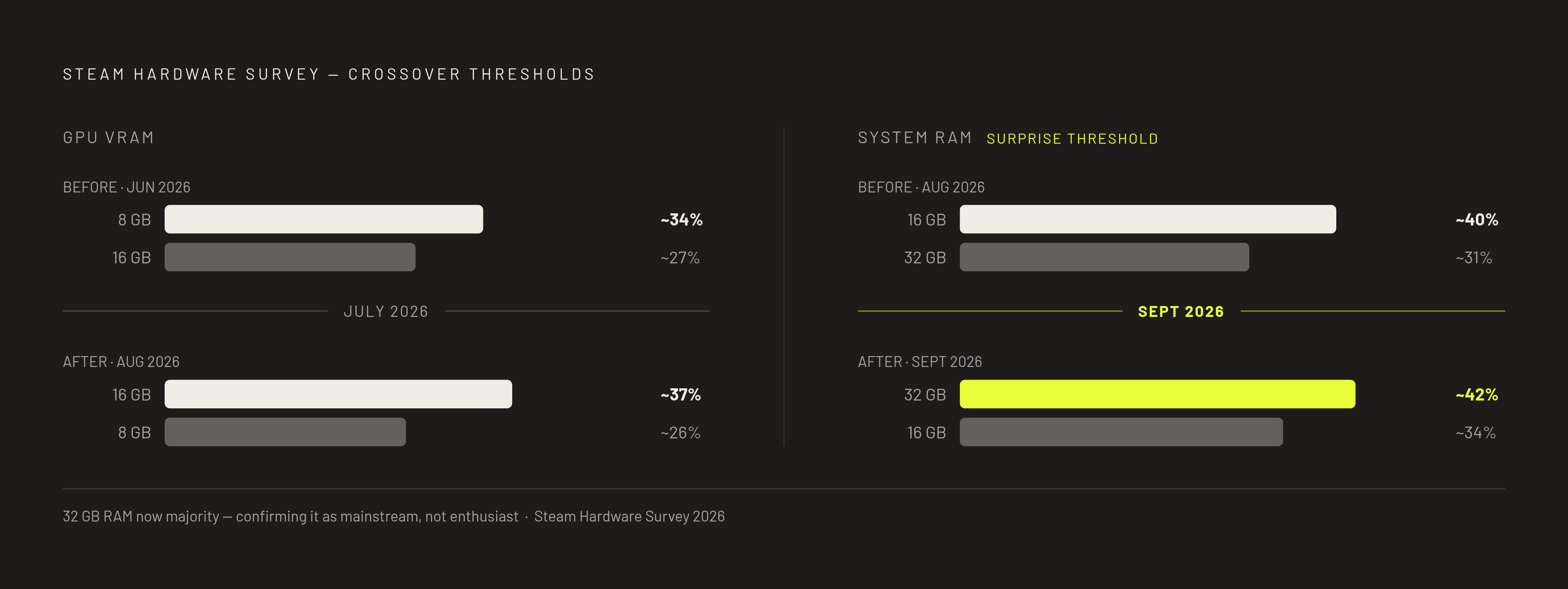
The recommendations above can read as enthusiast overreach until you set them against what the installed base actually looks like. The Steam Hardware Survey shows 16GB VRAM GPUs overtaking 8GB cards for the first time in July 2026, and that lead widens further in August, which gives the first hard evidence that the broader gaming community is finally moving past the 8GB ceiling that has constrained builders for years. The following month tells a parallel story on system memory: the September 2026 Steam Hardware Survey shows 32GB of RAM overtaking 16GB for the first time, confirming that the RAM floor recommended throughout this piece isn't a cautious overshoot but a reflection of where the community is actually landing.
That context matters for calibrating expectations. The components recommended here, 32GB of RAM, a 16GB VRAM GPU, fast NVMe storage, aren't enthusiast indulgences pitched above what a typical builder needs. They represent the direction the broader market is already moving, and building to these specs now means a machine that ages gracefully over the next several years, hitting a VRAM or RAM wall only well beyond that window.
Cases and aesthetics in a hybrid build: the functional and visual case for planning both at once
For a builder whose machine appears on camera, whether on stream, in video thumbnails, or as part of a desk setup captured for an audience, the case functions as part of the content itself, not just a functional enclosure. Choosing it with both airflow and appearance in mind is legitimate engineering, not vanity, because a case that looks good but throttles the hardware inside undermines the very content it's meant to showcase.
Mesh and filters cool a system, glass shows it off. If an all-glass case has no real mesh intake, it risks thermal throttling under the sustained creative loads this guide has described, so the 2026 sweet spot pairs a mesh-front panel with a panoramic tempered glass side, airflow where it's needed and visibility where it matters. Newegg Insider's case rankings sort neatly by use case. For airflow, the Fractal Design Torrent leads the field, with a massive open-mesh bottom front and five pre-installed fans, two 180mm units up front and three 140mm units along the bottom, all configured as intake to keep even demanding builds running cool under sustained load. For aesthetics and custom loop showcases, the Lian Li O11 Dynamic EVO sets the community standard, with its dual-chamber design and front and side tempered glass panels offering flexible fan and radiator configuration, though fans have to be purchased separately. For builders working with a tighter budget, the Montech TG3 at $59.90 comes with two pre-installed fan units, a triple-fan GF360 U REV array and a GF120 U rear exhaust fan, supports GPUs up to 430mm, and posted strong normalized CPU cooling results in testing.
Three aesthetic directions dominate 2026 builds: panoramic "fish tank" chassis that put every component on display, furniture-integrated designs using wood slats or reeded glass for builds meant to sit in a studio or office rather than look like a server tower, and side-panel LCD displays that double as real-time system monitors or a secondary screen. Visualizing the full desk setup, case, peripherals, lighting, together before buying anything is exactly the kind of decision that benefits from seeing a build in three dimensions rather than reading a spec sheet and trying to imagine how it will look next to everything else on the desk.
Visualizing and pricing a hybrid build before buying prevents the most expensive mistakes
A hybrid gaming-creator build carries more potential failure points than a pure gaming rig: CPU-and-motherboard platform compatibility, PSU wattage headroom for sustained creative loads rather than just gaming peaks, VRAM floors that affect both workloads at once, and storage capacity that fills faster than most builders expect once project files start accumulating. Every one of those is an expensive mistake to discover after the parts have already arrived.
Real-time compatibility checking catches exactly the problems a spreadsheet tends to miss: a PSU that clears a GPU's rated TDP on paper but falls short under combined CPU-and-GPU sustained load, a case that physically fits the GPU but blocks the radiator mounting points a creator-grade cooler needs, or a motherboard that supports the chosen CPU but doesn't have enough M.2 slots for two NVMe drives. Seeing a build in three dimensions before committing to it changes how these tradeoffs get made, since a case that looks proportionate in a spec table can look entirely wrong once it's sitting next to the desk and monitor setup it's actually going to live in.
BuildCores' library of thousands of accurate 3D models, paired with real-time compatibility checking, multi-retailer price comparison, and FPS performance estimates through 3DMark integration, makes it possible to see a hybrid build, price it, and stress-test its compatibility before a single component gets purchased. Its OpenDB keeps part data current through ongoing community contribution, so when a builder plans around a spec, it reflects what's actually available. The complexity this piece has described, GPU and encoder tradeoffs, CPU core-count decisions, RAM and storage floors, PSU and cooling sized for sustained loads, case choices that serve both airflow and appearance, is a planning problem, and planning problems get solved by seeing the whole build clearly before the money is spent.