1080p 144Hz Gaming PC Specs and Component Requirements
Most PC gamers still play at 1080p, making CPU choice surprisingly critical for 144Hz.

Summary
Most PC gamers still play at 1080p, making CPU choice surprisingly critical for 144Hz.
How to build around half the Steam player base still being at 1080p in 2026
Steam's hardware survey put 1080p at 51.12% primary display share heading into 2026. That's down from 61.17% in September 2023, but it's still an outright majority, and it's the fact that should reorganize how anyone approaches a 144Hz build this year. 1440p is 21.41% and climbing, slower than the enthusiast conversation around it would suggest. Most build budgets go wrong not in the parts list itself, but in the gap between what the monitor promises and what a given game engine actually delivers at that resolution.
The GPU install base backs this up from a different angle. The RTX 3060, a card that launched in early 2021, remains the single most-used GPU on Steam, a signal that most players aren't upgrading on anything like an annual cadence. The RTX 50-series, spread thin across the 5070, 5060, 5060 Ti, 5070 Ti, 5080, and 5090, hasn't come close to displacing older hardware yet.
Building for 1080p 144Hz in 2026 means building for the resolution most of the install base still runs. Treating 1080p as a solved, lesser problem, something you spec around rather than for, leaves a build mismatched to what most people actually own. The component choices below matter to a far larger audience than the 1440p and 4K debates that dominate enthusiast forums.
What "hitting 1080p 144Hz" means, and why it's not a single, fixed performance bar
A 144Hz panel describes what a monitor can display, not what any given game will produce. Feeding it 144 or more frames per second is a separate problem, and how hard that problem is depends entirely on what's running.
Esports titles make it easy. Competitive titles like Valorant and CS2 push well past 144 FPS at 1080p even on mid-range hardware, with so much headroom above 144Hz that competitive players go chasing 240Hz and higher panels instead. AAA titles at ultra settings are a different animal. Mid-range hardware realistically runs 100 to 130 FPS in a lot of current releases, and holding a true 144 FPS floor takes either more GPU or a willingness to back off a few settings sliders. Treating those two scenarios as the same design problem sends the build sideways before a single part gets ordered.
Resolution also decides which component does the heavy lifting. At 1080p, the CPU carries more of the relative workload than it does at 1440p or 4K, since there are fewer pixels for the GPU to chew through, so the game's logic, physics, and draw-call overhead become the bottleneck instead. Pairing a weak CPU with a strong GPU at 1080p caps the frame rate well below what that GPU can actually produce. That mistake gets cheaper the higher the resolution climbs, since at 4K the GPU carries a much larger share of the workload and the CPU becomes far less of a limiting factor.
GPU selection for 1080p 144Hz, where to draw the line between budget, mid-range, and more than you need
The GPU should absorb 35 to 45% of total build budget. It's the single component most responsible for frame rate, and shortchanging it to fund a fancier CPU or more RAM is the most common way a build underperforms its price tag.
At the budget tier, the AMD Radeon RX 7600 stands out for its solid 1080p performance, often available under $230. The NVIDIA RTX 4060 sits close behind at around $280, adding hardware ray tracing and DLSS upscaling. Either delivers strong frame rates in demanding titles at 1080p, more than enough to feed a 144Hz panel in most esports contexts.
The mid-range tier is where the real decision happens, and it comes down to the RTX 5060 Ti 16GB against the RX 9060 XT 16GB. Tested across eight games at native 1440p rasterization, the two land within about 1% of each other, roughly 78 FPS apiece. The RTX 5060 Ti brings ray tracing, DLSS 4 Multi Frame Generation, and Nvidia's AI feature set, plus a meaningful rasterization edge over the older RTX 4060. The RX 9060 XT counters with a price roughly $115 lower, DisplayPort 2.1a, RDNA 4, and genuine Linux support (kernel 6.14+, Mesa 25.0+). A quality 550W supply comfortably covers it alongside a mid-range CPU.
Anyone wondering whether they need more GPU than this is asking the wrong question. Practically any card from the RTX 5060 upward handles high-refresh 1080p without leaning on upscaling or frame generation, and pretending otherwise is how money gets wasted. The RTX 5070, RX 9070, and anything above them carry real headroom at this resolution, but their value lives at 1440p, not here. Put that money into the monitor instead of a GPU tier the resolution can't use.
The 8GB VRAM ceiling, why the cheaper version of the right card is often the wrong card
The Steam Hardware Survey showed 16GB VRAM cards extending their lead over 8GB cards for a second straight month, 26.92% share against 25.74%. That crossover affects texture budgets directly: game studios build them around what the installed base can actually handle, and as more players run 16GB cards, developers stop designing around 8GB ceilings.
Several recent demanding titles already push against 8GB of VRAM at 1440p ultra settings. Once an 8GB card hits that ceiling, the result is a visible, felt slowdown rather than a number in a benchmark chart.
The 8GB versions of the RTX 5060 Ti and RX 9060 XT look like a discount on the same card. They are not the same card. Anyone keeping a card three years or more will burn through whatever they saved at checkout the first time a texture budget outruns 8GB, and paying the difference for 16GB isn't really an upgrade so much as buying the version of the card actually built to survive its own lifespan. Skip the lower-memory version. It's the wrong buy at this price point regardless of how the sticker looks next to its 16GB sibling.
CPU matching for 1080p 144Hz, where to spend, where to save, and when 3D V-Cache matters
1080p leans harder on the CPU than higher resolutions do, so a weak chip caps frame rates even behind a genuinely strong GPU. At 4K the GPU carries the vast majority of the workload and the CPU becomes far less of a factor; that relationship shifts hard as resolution drops, raising the importance of CPU choice here compared to most 1440p or 4K conversations.
For most builders targeting 1080p 144Hz, a six-core modern chip is the sweet spot, and spending past it is close to wasted money. The Ryzen 5 7600, used in both a roughly $950 build and a roughly $1,200 build referenced by Perfcore, doesn't bottleneck any GPU in its price class at 1080p or 1440p. Other strong six-core options exist in the same range; the i5-14400F handles most games fine too but can bottleneck higher-end GPUs in demanding titles at this resolution. The practical gap between a roughly $200 chip and a $450 chip is modest at 1440p and shrinks further at 4K. Money saved here converts into far more frame rate per dollar when it goes toward the GPU instead.
3D V-Cache chips answer a narrower question, and most builders don't need to ask it. The AMD Ryzen 7 9800X3D, 8 cores, 16 threads, boosting to 5.2GHz with 96MB of cache, tests out as a top-tier gaming CPU of the current generation because game engines stall waiting on data more often than they stall waiting on cycles. A bigger cache keeps frame delivery steady at high refresh, which shows up as fewer 1% low dips and less micro-stutter rather than a big jump in average FPS. The Ryzen 7 7800X3D, same core and thread count with 96MB of L3 cache, earns its premium at high-refresh competitive 1080p, where the CPU is the actual limiter. Reach for an X3D chip in that scenario, or when pairing a high-end GPU at 1440p. Outside those two cases, the premium buys frame rate the game was never going to give up.
High-core-count chips well beyond eight cores are the mirror-image mistake. Game engines tend to see diminishing returns well before they can use many cores, so the extra silicon buys little in gaming terms no matter what it costs. Overspending on the CPU at the GPU's expense is the single most common error across every price tier. Pick the GPU tier first, match a CPU to it, and don't work the problem backward.
RAM, storage, power, and platform, the supporting specs that quietly make or break a 144Hz build
Sixteen gigabytes of RAM is the floor for gaming in 2026, but 32GB is the right call for anyone building on AM5 with a Ryzen 5 7600, 9600X, or 9800X3D. The price gap between 16GB and 32GB kits is small enough that the extra headroom is close to free, and it turns the machine into a usable work rig on top of a gaming one.
Speed matters as much as capacity on AM5. DDR5-6000 is the target, and the 9800X3D in particular benefits from hitting that speed rather than running slower kits. XMP or EXPO has to get switched on manually in BIOS, or the system quietly runs at a fraction of the kit's rated speed, a setting skipped often enough that it's worth double-checking on any fresh build. Run two sticks, not one: dual-channel makes a real difference in smoothness, and single-stick setups leave performance sitting on the table for no reason.
Platform choice comes down to AM5 or Intel's LGA1851, and AM5 wins that argument. AM5 has confirmed socket support through at least 2029 with Zen 6 compatibility planned, so a CPU upgrade later doesn't force a full motherboard swap. Anyone building fresh right now who picks LGA1851 over AM5 is buying a shorter runway for no real benefit.
Storage-wise, a 1TB Gen 4 NVMe drive is the practical minimum, and Gen 4 speeds keep the build ready as more titles adopt DirectStorage. A reputable Gen 4 NVMe drive fits the bill here. At the $1,200-plus tier, go 2TB instead: modern AAA titles fill a 1TB drive fast, and juggling free space every time a new game lands is a small, constant drag that's cheap to avoid.
Power supply sizing follows the GPU directly. A quality 80+ Gold unit sized for a mid-range GPU comfortably covers the RX 9060 XT alongside a mid-range CPU; step up to 650W 80+ Gold for the RTX 5060 Ti build to leave headroom for peak loads. The 80+ Gold badge isn't decoration. A quality power supply protects every other component downstream of it, and cutting corners there is a false economy no matter what tier the rest of the build costs. Don't size a PSU to its rated ceiling; leave room for transient spikes and whatever upgrade comes next.
Cooling is the least dramatic item on this list, and the internet oversells it badly. A quality air cooler, something like the Thermalright Peerless Assassin, handles the Ryzen 5 7600 and similar chips without issue, and liquid cooling buys nothing at this tier beyond added complexity and cost. Case airflow matters more than the cooler itself for keeping sustained temperatures in check: a mesh mid-tower does the job without a premium price tag attached.
Three complete build configurations across the 1080p 144Hz range
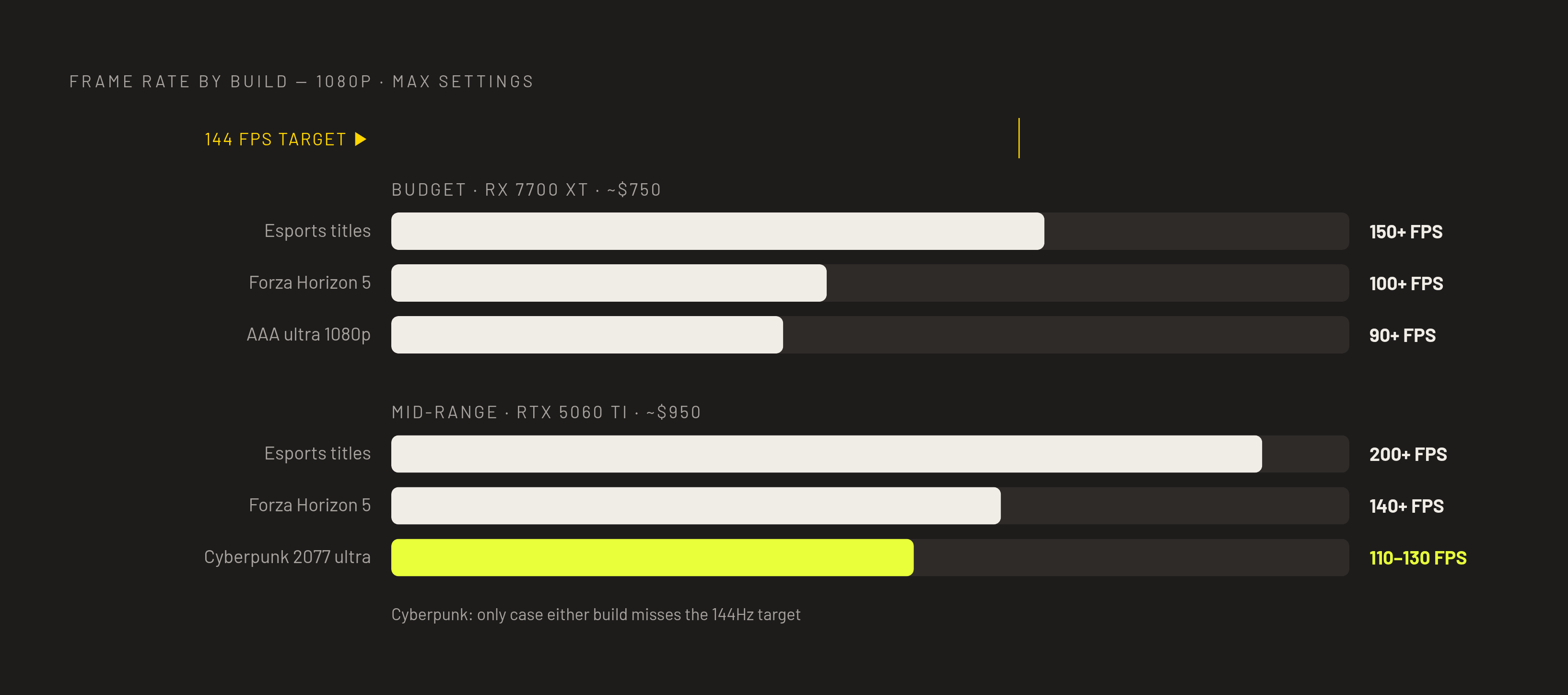
Budget, around $750. RX 7700 XT paired with a Ryzen 5 7600 on AM5. This combination hits 90-plus FPS at 1080p ultra and 65-plus FPS at 1440p in AAA titles, backed by actual build and test data rather than spec-sheet math. It's the right call for competitive FPS players, Valorant, CS2, Fortnite, chasing the highest frame rate a 144Hz-and-up monitor can show. The GPU already clears the frame rate target with room to spare, so any leftover budget belongs in the monitor, not another GPU tier.
Mid-range, around $950. Ryzen 5 7600 paired with the RTX 5060 Ti 16GB, built for someone gaming at 1080p 144Hz today who expects to move to 1440p within a year or two. At 1080p it pushes every esports title past 200 FPS, runs Cyberpunk 2077 at 110 to 130 FPS at ultra, and holds Forza Horizon 5 above 140 FPS. Supporting specs are 32GB of DDR5-6000, a 1TB Gen 4 NVMe drive, and a 650W 80+ Gold supply. At 1080p this build is essentially unconstrained, so the extra spend over the budget tier buys a real, ready-made path to 1440p later. It's buying a real, ready-made path to 1440p later.
At $1,200-plus, the high-end crossover tier, 1080p 144Hz is the floor rather than the ceiling. This is a build meant to hold both 1080p and 1440p comfortably as monitors and priorities shift over its life, rather than one chasing a single resolution and hoping the other comes along for free.