VRAM Requirements by Game Type and Resolution
VRAM needs vary by game genre and resolution, not resolution alone.

Summary
VRAM needs vary by game genre and resolution, not resolution alone.
VRAM requirements in 2026 depend on the games you play and the resolution you target. This guide turns those two choices into a buying grid. 8GB still fits a focused 1080p build, 12GB covers much of modern AAA, and 16GB is the sensible standard for demanding 1440p gaming and the starting point for 4K.
Why VRAM behaves differently from every other spec on a GPU
VRAM holds the data a GPU needs while rendering a game. When that working set no longer fits, the GPU has to fetch data from system RAM across the PCIe bus, which is much slower. More GPU computing power cannot remove that bottleneck. The game can do more than run at a lower frame rate: it can hitch, show textures late, or pause between areas. Some titles become unplayable or refuse to launch.
That makes memory capacity different from a performance dial. Below the capacity limit, the GPU has room to work, but crossing it can break frame-time consistency. Higher resolutions and ray tracing both increase the load, so a card can run out of space before it runs out of computing power. Frame generation adds an awkward twist to that problem. A feature sold on smoother motion needs extra VRAM and can worsen the very stuttering it is supposed to relieve.
How game genre sets the VRAM floor before resolution even enters the picture
The first filter for a builder is game type. Genre shapes texture complexity, scene density, and how much of an environment the game needs ready at once. Resolution then adds to that baseline demand. A 1440p esports player and a 1440p open-world player need to buy different amounts of memory, even though their monitors match. Treating them as the same buyer is the central mistake in a resolution-only guide.
Competitive titles such as CS2, Valorant, Overwatch 2, and Rocket League put high frame rates ahead of how much detail they show. Their working sets are small enough to fit easily into 8GB at 1080p. Linear AAA and horror games take a different approach. Alan Wake 2, Resident Evil 4 Remake, and The Callisto Protocol use constrained spaces and curated scenes to pack detailed textures into smaller draw distances. Their demand sits in a mid-range window at 1440p ultra, rather than matching either lightweight competitive games or the largest open environments.
Open-world AAA places more strain on memory because large texture sets must load dynamically as the player moves. Cyberpunk 2077, Red Dead Redemption 2, Hogwarts Legacy, and Black Myth: Wukong occupy the demanding end of that range. Ray tracing is a separate addition to this baseline. Full RT or path tracing adds to the memory a game needs in any genre that supports it. A buying grid needs to show a game's workload both with those effects on and with them off.
What the genre grid looks like once resolution is layered in at 1080p
At 1080p, 8GB remains a defensible choice for the right library. CS2, Valorant, Fortnite Performance mode, Overwatch 2, Marvel Rivals, and League of Legends fit comfortably within that capacity. A high refresh-rate target does not by itself change their modest texture requirements. Older AAA games from the 2019–2022 window also fit comfortably at high settings.
Modern AAA is where the qualification starts to bite. Monster Hunter Wilds consumes above 9GB at 1080p High, while Assassin's Creed Shadows uses above 8GB at the same resolution and preset. Neither example needs a move to 1440p to overrun an 8GB buffer. Bethesda's official minimum specifications for Indiana Jones and the Great Circle require at least 8GB for native 1080p at low settings and 60fps.
The buying distinction is therefore about settings and library. A pure esports or older-library build can reasonably stay at 8GB. A builder planning to play modern AAA at high or ultra should budget for 12GB instead.
What the genre grid looks like at 1440p — where the VRAM question gets urgent
At 1440p, the conventional PC gaming resolution, memory selection becomes a sharper constraint for modern AAA. Bethesda's recommended specifications for Indiana Jones list the RTX 3080 Ti (12GB) or RX 7700 XT (12GB) for native 1440p. Id Software's recommended tier for Doom: The Dark Ages requires 10GB. Those requirements put demanding releases beyond the old 8GB baseline. For this class of gaming, 12GB is the realistic minimum.
The distinction between 12GB and 16GB is library coverage. Most current titles without heavy ray tracing fit the smaller tier, but simulation and demanding RT workloads can put it under pressure. Flight Simulator 2024 is a demanding simulation case that pushes the practical recommendation toward 16GB. Path-traced games at 1440p ultra also expose the limits of 12GB.
The consequences are not limited to a memory-usage counter. In a same-GPU comparison at 1440p ultra, the 8GB variant was 39.6% slower than the 16GB variant in ray-traced titles. The GPU core was not the differentiator. Memory exhaustion created the gap, which widened substantially at higher resolutions. That is why a faster-looking GPU specification cannot automatically make up for a buffer that is too small.
For a builder targeting 1440p ultra across a full AAA library, 16GB is the recommended standard. It has room for almost all current AAA workloads, including RT-enabled titles and UE5 games, as well as the games known to strain 12GB. That extra room is particularly relevant when the card is expected to last several years. It is a choice grounded in the workloads the smaller tier already struggles to contain, with no guarantee against every future game's demands.
What the genre grid looks like at 4K — where 16GB is the floor, not a luxury
At 4K, demanding games move 16GB from a recommendation to a functional minimum. Open-world games at ultra settings use close to or more than 15GB, and path-traced workloads can use more than 12GB even before ultra textures are added. The smaller tier has little room left. Bethesda's specifications require 16GB for native 4K in Indiana Jones on NVIDIA hardware. Id Software also calls for 16GB at the Ultra tier for Doom.
Even those requirements need a settings qualification. A 16GB card has room for lighter 4K play at high settings and demanding open-world games with upscaling, but native 4K path tracing can still strain it. Minimum does not mean unlimited. The most demanding combination of resolution, textures, and lighting is where 24GB or above begins to make sense. For modern AAA at native 4K ultra, 8GB is no longer a useful compromise.
The case for 24GB should stay narrow. The supplied 2026 gaming picture does not identify a gaming workload that exhausts that capacity, so the argument is room for longevity and particularly demanding settings. Native 4K path tracing and high-refresh 4K ultra across a broad AAA library are the relevant gaming uses. Dual-purpose builds add another reason to buy it. DaVinci Resolve, Blender, Stable Diffusion, and local LLMs can need substantial memory beyond the demands of ordinary gaming.
Why upscaling and frame generation do not change the grid as much as marketed
Can DLSS, FSR, or XeSS make the smaller memory tier enough? Sometimes, but they do not shrink everything a game stores. Upscaling renders internally at a lower resolution, reducing the memory needed for the rendered image. The game still loads textures, geometry, and ray tracing data for the full-resolution settings. The framebuffer saving therefore addresses only part of the working set.
With DLSS 4 or FSR 4 enabled, VRAM load can fall by roughly a quarter to a third compared with native rendering. That can keep 8GB viable at 1080p in supported titles. Developers are also increasingly designing around upscaling as the intended experience. A meaningful reduction still may not bring a demanding workload inside the card's capacity.
Frame generation works against that saving by adding buffers of its own. On an 8GB card at 1440p, enabling it frequently pushes memory demand past the limit and disrupts frame-time consistency. Upscaling does not necessarily prevent that outcome. The 8GB RX 9060 XT's 1440p failure cases occurred with FSR4 Quality already enabled, while demanding titles with RT and frame generation can reach a 14GB working set at 1440p ultra. These features change the calculation, but they do not erase the need to buy enough memory.
What the Steam installed base tells builders about where game developers are aiming
The July 2026 Steam Hardware Survey placed 16GB at 25.9% of surveyed systems, just ahead of 8GB. It was the first time 16GB had become the platform's most common VRAM configuration. By August 2026, 16GB represented a growing share, while older 2GB and 4GB systems were declining. The 8GB row grew too, so this was not simply a transfer from 8GB to 16GB.
The platform breakdown complicates any claim that 8GB is finished. On Windows alone, it remained the most common configuration, while macOS and Linux changed the combined result. Improved capture of RDNA 4 GPUs, including the RX 9070 XT and RX 9060 XT, may have contributed to the reported 16GB share. Separately, the RTX 5070 became the most common single GPU among Steam users by September 2026, putting a 12GB card at the top of the individual-model ranking.
As 16GB becomes more common, developers have more reason to calibrate their baseline expectations toward it. That supports the longevity case for buying above 8GB. Developers may still support smaller cards, and competitive games can still get by with small buffers. It means an 8GB purchase increasingly depends on a defined library, while 12GB and 16GB better match the direction of mainstream hardware.
The practical buying grid — matching VRAM tier to game type and resolution
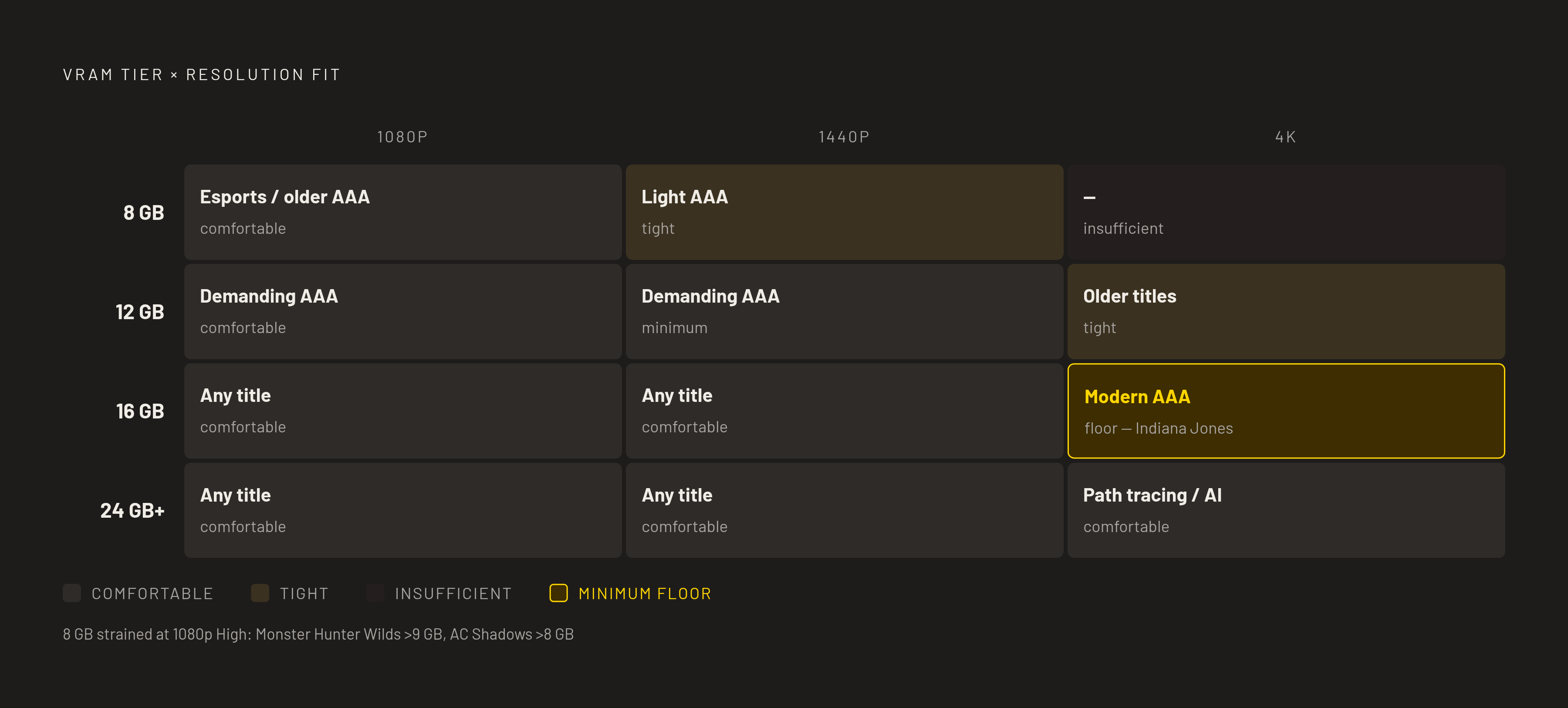
For a builder applying the grid, 8GB belongs with 1080p esports, indie games, emulation, and older AAA at high settings. It remains useful through 2026 and into 2027 with settings compromises where needed. Its limits are already visible in modern open-world games at 1080p ultra. It is a poor buy for demanding 1440p ultra or modern AAA at 4K. A buyer expecting a three-year minimum lifespan without touching settings should not stop at this tier.
The 12GB tier fits modern AAA at 1080p high or ultra and lighter 1440p gaming at high settings. It has room for most current games without heavy RT. The trade-off appears in demanding simulation, 1440p ultra path tracing, and 4K ray-traced workloads. The 16GB tier has room for a wide range of games at 1440p ultra with RT and UE5 games, as well as 4K high settings or open-world ultra with upscaling. Native 4K path tracing is the point where that larger buffer can also become tight.
The 24GB-and-above tier is for those demanding native 4K workloads, high-refresh ultra gaming, or a machine that also does memory-heavy creative or AI work. It is not the default gaming recommendation. The choice should follow the intended workload rather than the appeal of the biggest number. There is no reason to buy as much memory for a competitive 1080p build as for a native 4K path-tracing machine. Genre and resolution keep those purchases separate.
This decision belongs in build planning, before components are ordered. A 3D visualization can help plan the machine, while the genre-and-resolution grid shows how much memory it needs, which its looks cannot tell. The two serve different purposes. System RAM can be upgraded after purchase, but GPU memory cannot.