PSU Wattage Selection for Modern GPU Builds
Modern GPUs demand both enough wattage and the right connector standard to avoid mid-game shutdowns.

Summary
Modern GPUs demand both enough wattage and the right connector standard to avoid mid-game shutdowns.
Picking a power supply used to mean checking one number against another. That single-variable approach no longer holds, and the cost of guessing wrong has gone up along with it. Flagship GPUs in 2026 pull substantially more sustained power than the previous generation did, a result of bigger dies, higher clocks, and more transistors packed onto the silicon. At the same time, those same cards run power management schemes that shift them between idle and full load in milliseconds, throwing off transient spikes that jump well above the card's rated TDP for brief instants, and the power supply has to absorb that surge without tripping its own protection circuits.
A PSU sized only to a card's average draw will sail through any desktop stress test and then shut the whole system down the moment a demanding scene loads in-game, because the transient spike is what trips over-current protection. And this isn't confined to enthusiast-tier builds chasing an RTX 5090. Buyers picking up an RTX 5060, RTX 5060 Ti, or Radeon RX 9060 XT, cards aimed squarely at first-time builders, are now getting pulled into a conversation about transients and connector standards that didn't used to matter at this price point. The question has effectively split in two: does the PSU carry enough wattage, and does it use the right connector standard to handle how that wattage actually gets delivered. The rest of this piece works through both.
The sizing formula: CPU peak plus GPU peak plus system overhead, multiplied by 1.25
The standard formula is simple to write down: add the CPU's peak wattage to the GPU's peak wattage, add roughly 90 to 150 watts for everything else in the system, then multiply the total by 1.25 and round up to the nearest standard PSU size. The RTX 5060 Ti carries a 180W TGP figure. The RTX 5080 carries a 360W TGP figure. Every part of that sentence matters, and the CPU term is the one builders most often get wrong. The RTX 5090 carries a 575W TGP figure.
Peak wattage belongs in the formula, not the CPU's rated TDP. The CPU rarely hits its own peak at the exact instant the GPU hits its peak during ordinary gameplay, but the formula uses peak values anyway, because sizing for the worst case keeps the system stable no matter what load pattern occurs. Swapping a mid-range CPU for a high-end one in the same GPU tier can add well over a hundred watts to the total, a delta large enough to turn a build that looked adequately specced on paper into one that shuts down under load.
Run the math on a concrete example. An RTX 5070 carries a 250W TGP figure. Pairing it with a mid-range Ryzen chip, system overhead for a couple of SSDs, RAM, fans, and an air cooler, then multiplying the total by 1.25, gives the recommended PSU wattage. That multiplication puts the recommended PSU at about 650 watts. The RTX 5070 Ti carries a 300W TGP figure. The RTX 5060 carries a 145W TGP figure.
AMD's RX 9070 XT carries a 304W TBP rating. The system overhead term (90 to 150 watts) covers the motherboard, RAM, storage, cooler, and fans, and it climbs toward the top of that range with multiple SSDs, a liquid cooling loop, or a heavy RGB setup.
Factory-overclocked GPU variants only add 3 to 8% more power than a reference card, since manufacturers get there through chip binning and better cooling rather than pushing more voltage through the board. That's not enough of a gap to justify sizing up a whole PSU tier just because the card has a factory overclock.
What the formula produces at each build tier
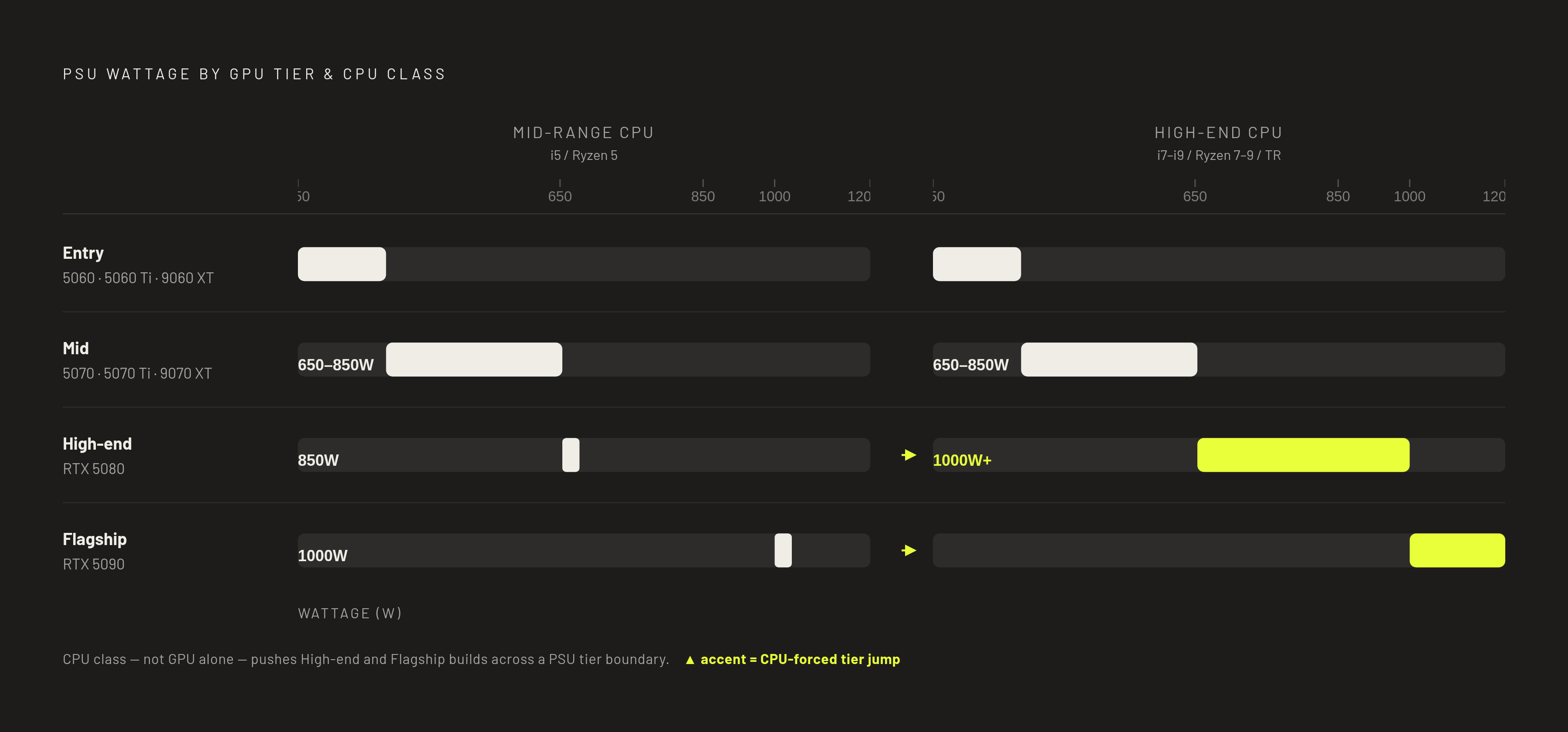
Running the formula across the current GPU lineup produces a clear set of tiers, though the CPU pairing moves the answer more than a lot of builders expect.
Entry-level builds, spanning the RTX 4060, RTX 5060, RTX 5060 Ti, and Radeon RX 9060 XT in its 8GB or 16GB configuration, draw 250 to 350 watts at load including the CPU. The recommendation moves to 600W with the 5060 Ti. The Radeon RX 9060 XT, in either its 8GB or 16GB configuration, comes in lower at 450W. Anyone planning a near-term GPU or CPU upgrade should step up one tier proactively.
High-end builds, built around the RTX 5080, call for 850W when paired with a Core i5 or Ryzen 5, and the number climbs to a four-figure wattage recommendation with a Core i7/Ryzen 7 or a Core i9/Ryzen 9/Threadripper chip. Seasonic's own guidance puts the RTX 5080 paired with a Ryzen 7 X3D or Core Ultra 7 at 850W or above. Stacking a power-hungry CPU with multiple SSDs and a liquid cooling loop raises the baseline by another 100 to 150 watts on top of that.
Flagship builds: the recommendation crosses into four-figure wattage territory paired with a Core i5/Ryzen 5 or Core i7/Ryzen 7, and it climbs to an even higher four-figure wattage recommendation with a Core i9, Ryzen 9, or HEDT/Threadripper chip. Seasonic places the enthusiast tier, RTX 5090 alongside a Ryzen 9 or Core Ultra 9, at the top end of its recommended range.
The CPU column isn't a footnote here.
The 1.25 headroom buffer is the PSU's operating sweet spot, not padding
Shaving the multiplier to save fifty dollars on a PSU trades away two things a builder actually needs: efficiency and stability under load.
A power supply runs most efficiently, and stays quietest and coolest, at a moderate fraction of its rated capacity. Pushing it toward its ceiling raises heat, accelerates wear, and drops efficiency below the unit's own certified rating. Plenty of premium PSUs ship with a Zero RPM fan mode that keeps the fan silent below a set load threshold, and that mode only stays usable if the system has enough headroom to keep draw under it during normal use.
The bigger argument is mechanical. A GPU's rated TDP describes an average rather than a ceiling. During a scene load or a shader compile, draw can spike well above that average for a matter of milliseconds, and a PSU with no slack in reserve reads that spike as an overload and cuts power on the spot. That's the mechanism behind the "runs fine on the desktop, crashes the instant a game loads" complaint that shows up constantly in build forums. A well-built 650W unit with real headroom will absorb that kind of spiky load more reliably than a mediocre 850W unit that can't respond to a transient fast enough, so the wattage number on the box isn't the whole story.
There's a secondary payoff. A PSU bought with headroom above the current build's needs can often absorb a future GPU or CPU upgrade without forcing a replacement.
ATX 3.1 and the 12V-2×6 connector: why the standard matters as much as the wattage number
Wattage answers half the question. The PSU's standard and physical connector need to be built to handle how that wattage actually arrives at the card, and for builds using modern high-end GPUs, that standard is now as important a selection criterion as the wattage figure.
ATX 3.1 is the current PSU standard, and units built to it are specifically designed to absorb the transient power excursions that modern GPUs throw off without tripping overcurrent protection, tightening voltage regulation and transient response so momentary spikes no longer shut the system down. The connector that came bundled with ATX 3.1 is the 12V-2×6, which replaces the older 12VHPWR connector used on the previous generation of high-end builds. That older connector carried well-documented reliability problems of its own.
Not every build needs to weigh this. The GPUs where this actually matters, because their power draw spikes hard and fast enough to stress a connector, are the RTX 5080, the RTX 5090, and the RX 9070 XT and anything above it, the same cards that pull buyers into this conversation. Below that tier, wattage headroom still governs the decision, and connector standard becomes a secondary concern rather than a deciding one.
The industry has responded to connector incidents with its own hardware fixes. ASRock's Phantom Gaming PG-1300G, for instance, carries a thermal sensor that enthusiast build guides now flag as a practical feature worth checking for, on top of the wattage rating rather than instead of it. For any build running an RTX 5080, RTX 5090, RX 9070 XT, or above, ATX 3.1 compliance belongs on the checklist by default.
The connector melt problem
Reports of melted 12V-2×6 connectors on flagship cards, and to a lesser degree the tier just below them, kept appearing through 2026, even on cards using their native cables and running within their power limits. Current imbalance across the connector's pins causes those failures, not simply too much total wattage flowing through it.
Testing from der8auer measured the imbalance directly: one pin on a 12V-2×6 connector carried roughly 250 watts on its own, while the other pins on the same connector carried only 2 to 5 amps each. The connector and its cable are rated for about 8 amps per pin, so a single overloaded pin can reach damaging temperatures while the connector's total draw stays inside its rated limit. That's the detail that makes this a wiring and load-balancing problem rather than a simple case of drawing more power than the connector was built for.
Hardware Unboxed made the risk concrete on a test bench running an ASUS ROG Astral RTX 5090 paired with a be quiet! Dark Power 13 PSU. Host Steve caught the fault only by touching the cable and finding it hot enough to burn his hand; a thermal camera confirmed the connector had climbed above 150°C, rising to roughly 175°C under sustained load. Nothing in the setup flagged the fault through software or an alarm. It took physical contact with the cable to catch it. That's the practical shift builders need to make: a correctly sized PSU on an ATX 3.1 standard is the starting point, but seating the 12V-2×6 connector fully and checking it under load is part of the job now too, not an afterthought.