Best GPU for 4K Gaming at 60 Hz vs 120 Hz
The right GPU for 4K gaming depends on whether you're targeting 60 Hz or 120 Hz refresh rates.

Summary
The right GPU for 4K gaming depends on whether you're targeting 60 Hz or 120 Hz refresh rates.
Choosing a GPU for 4K gaming is not one decision, it's two, and they point to different hardware. A 4K frame holds 8,294,400 pixels, and that pixel count is the main factor separating a card that handles 4K well from one that merely gets through it. The mistake that costs builders the most money or the most frustration is treating a 60 Hz target and a 120 Hz target as the same problem at different intensities, when in fact they aren't. Doubling the refresh rate doesn't double the GPU demand, it compounds with the pixel load already in play, and once ray tracing or heavier lighting effects enter a scene, the number of cards that can actually hold the higher target shrinks fast. A builder who sets the wrong target before shopping ends up in one of two bad spots: paying flagship prices for a panel that caps out at 60 Hz, or buying a card that technically runs 4K and then watching it struggle the moment the refresh target doubles. Before comparing any specific cards, a builder needs to know which of these two problems they're actually solving, and tools like Build Core's interactive 3D configurator let you set that refresh-rate target upfront and see in real time which GPUs actually meet it, rather than discovering the mismatch after the parts have shipped.
VRAM, upscaling support, and connectivity minimums to check before evaluating any card
Before refresh rate even enters the conversation, three baseline requirements cut the GPU market down to a workable list: how much VRAM the card carries, whether it supports hardware-accelerated upscaling, and whether its ports can actually carry a 4K signal at the frame rate you want. If any one of these checks is skipped, the card won't hold up regardless of tier, making the refresh-rate discussion that follows moot.
VRAM is the clearest filter. 16 GB is the functional floor for 4K gaming in 2026, the point at which stock 4K gameplay in texture-heavy open-world titles runs without the stutter that comes from a card running out of memory mid-scene. The RTX 5070's 12 GB of GDDR7 is a real ceiling, not a theoretical one, and it constrains an otherwise capable card the moment a game's textures outgrow it. The market is already moving past the old 8 GB standard. Steam's August 2026 hardware survey put 16 GB GPU configurations at 26.92% of surveyed systems, ahead of 8 GB setups, and that crossover says something about direction: buying below 16 GB now means buying into a tier that's shrinking, not holding steady.
Upscaling has stopped being a bonus feature bolted onto a GPU's marketing page. If you skip frame-generation technology, the 2026 buying guide for 4K cards says you accept a substantially lower average frame rate in demanding titles, which makes DLSS 4 and FSR 4 closer to required infrastructure than optional extras. Hardware-accelerated upscaling runs through dedicated silicon rather than a generic software layer, and you need it if you want stable high-refresh 4K output. Software-only alternatives don't belong in the same conversation.
Connectivity is a shorter check but still a real one. HDMI 2.1 and DisplayPort 2.1 are the two standards with enough bandwidth to carry 4K at 120 Hz, and which one a buyer needs comes down to what they're plugging into: a monitor typically runs DisplayPort, a TV typically runs HDMI 2.1. Confirm a mid-tier AIB card carries both ports before buying it, because not every one does. Once a refresh-rate target is set, these three specs, VRAM, upscaling support, and port type, act as hard filters, and platforms like Build Core's visual builder with real-time compatibility checking surface these details for every card in the configurator, so a candidate can be checked against all three before price even enters the picture. With those boxes checked, the real decision is which side of the refresh-rate fork you're on.
The 4K 60 Hz tier: which cards reliably hold 60 fps without demanding a flagship budget
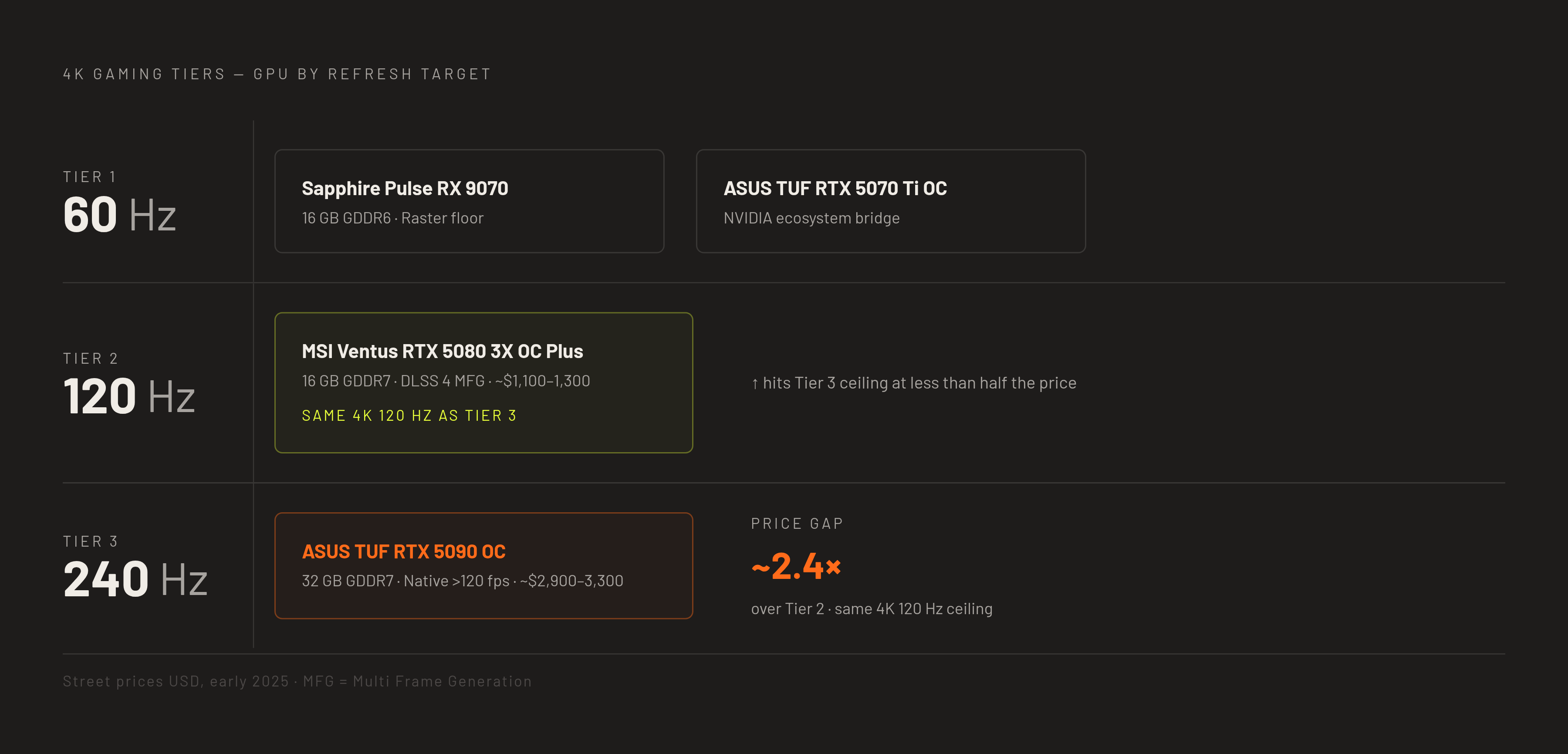
For a builder whose panel tops out at 60 Hz, the GPU market is more forgiving than most assume, and two cards from two different architectural families mark the honest floor and the comfortable ceiling of this tier: the Sapphire Pulse RX 9070 and the ASUS TUF RTX 5070 Ti OC. Neither requires flagship spending, and neither is wasted on a 60 Hz panel the way a higher-tier card would be.
The Sapphire Pulse RX 9070, with 16 GB of GDDR6, is the raster floor for 4K 60 Hz. It runs 50 to 65 fps at 4K on high settings natively across current AAA titles, and turning on FSR 4 Quality lifts that comfortably past 60, making it the honest entry point for this resolution. Its RDNA 4 architecture brings FSR 4 support through AMD's transformer-based ML model, and the 16 GB of memory clears the VRAM floor with room to spare. It fits a builder who picked up a 4K panel on sale and wants a card that handles it cleanly without reaching for premium pricing.
Above it sits the Sapphire Pulse RX 9070 XT, also with 16 GB of GDDR6, which functions as the value ceiling for raster-focused 4K between 60 and 100 Hz. It lands 55 to 80 fps at 4K ultra natively in raster-leaning AAA titles, and FSR 4 Quality extends that range toward the 100 Hz zone in lighter titles. In pure raster workloads, competitive shooters and open-world games without heavy ray tracing, the 9070 XT trades blows with pricier NVIDIA cards, and its 16 GB gives it a real VRAM advantage over the RTX 5070 for texture-heavy mods and future game installs. Where ray tracing gets heavy, the gap moves in NVIDIA's favor.
The ASUS TUF RTX 5070 Ti OC is the bridge card for builders who want access to NVIDIA's DLSS ecosystem without stretching to the RTX 5080. It handles most games above 60 fps at high settings at 4K with DLSS Super Resolution doing much of the work, running DLSS Quality as its default mode. If you want a path toward 120 Hz in lighter titles through DLSS 4 Multi Frame Generation, this is the honest budget NVIDIA option, but it needs a power supply rated at 850 W or higher. But there's a real misalignment trap here: if the panel is hard-capped at 60 Hz, the RTX 5070 Ti's native output of roughly 98 fps at 4K is more performance than that panel can show, and the RX 9070 XT becomes the better value in that exact configuration.
These two paths, AMD's raster efficiency and NVIDIA's upscaling ecosystem, represent genuinely different bets. Before you commit to either card, you can load both into the Build Core 3D configurator alongside your case and cooling setup to confirm physical clearance. Triple-fan AIB models at this tier regularly exceed 320 mm in length, and catching a fitment conflict before the parts arrive avoids a mistake that's expensive to fix after the fact. Build Core's multi-retailer price comparison also surfaces street pricing alongside MSRP, which matters given how much supply conditions have shifted RTX 50-series pricing away from launch numbers.
The 4K 120 Hz tier: what the RTX 5080 delivers
The RTX 5080 is where 4K gaming at high refresh stops asking for a compromise. It hits ultra settings at native 4K in most AAA titles on its own, and layering in DLSS 4 Quality with Multi Frame Generation extends that performance to genuine 120 Hz or 144 Hz panel saturation. That combination, not the RTX 5090, is the value pivot for this tier.
The MSI Ventus RTX 5080 3X OC Plus represents the mainstream pick for this target. It runs 70 to 100 fps at 4K ultra natively in current AAA titles, and DLSS 4 Quality with Multi Frame Generation pushes that to full 120 Hz or 144 Hz saturation. It carries 16 GB of GDDR7 on a 256-bit bus, and DLSS 4's Multi Frame Generation is the feature that separates its capability profile from AMD's options at this specific refresh target. MSI's own specification lists a recommended PSU of 850 W for this card. Many AIB triple-fan models at this tier exceed 320 mm, though some measure as short as roughly 303 mm, so case clearance needs checking against the specific model's listed dimensions.
You need to be precise about what DLSS 4 Multi Frame Generation actually does. It takes a strong native frame rate and multiplies it into additional frames, rather than generating playable performance out of a card that can't produce a solid base rate on its own. That distinction matters because the common objection to frame generation, that the extra frames are somehow less real or less responsive than native ones, has real technical grounding, and the next section takes it up in full.
The RTX 5080 holds the value pivot in this tier rather than the RTX 5090 for a straightforward reason: price and availability. The RTX 5090 delivers higher native frame rates at 4K, but DRAM shortages have kept street prices well above its MSRP of $1,999, running roughly $2,900 to $3,300 in practice. That puts it out of reach for most builders targeting 120 Hz on a reasonable budget. The RTX 5080, at roughly $1,100 to $1,300 street, reaches the same 4K 120 Hz panel saturation through DLSS 4 Multi Frame Generation in the large majority of titles. The 5090's advantage appears mainly in the most demanding games and in path-traced scenarios, and is far less pronounced in the everyday 120 Hz case.
AMD's position at 120 Hz has a real gap. The RX 9070 XT runs 55 to 80 fps natively at 4K ultra in raster titles, and FSR 4 can push it toward 100 Hz in lighter workloads, but AMD's current frame generation produces one interpolated frame between real frames, compared to NVIDIA's Multi Frame Generation, which can produce up to four. That asymmetry is the specific software advantage NVIDIA holds for the 4K 120 Hz target, a structural gap rooted in the frame generation architecture itself.
An RTX 5080 build calls for real planning around its 16 GB GDDR7 footprint and 3-slot cooler, which needs a case with genuine triple-fan clearance. The Build Core 3D configurator shows how the card sits against the motherboard, cooling tower, and case wall before a single part gets ordered, and its FPS performance estimates, built on 3DMark integration, let a builder cross-check expected output against a planned CPU pairing. An 8-core CPU feeding a 5080 with DDR5 memory running at its rated XMP speed makes a measurable difference to the render queue at 4K.
The 4K 240 Hz / uncompromised flagship tier: what the RTX 5090 adds and who genuinely needs it
The RTX 5090 serves a narrower and more specific use case than the RTX 5080: native 4K at high frame rates in every title, path tracing at playable speeds, and saturation of 240 Hz OLED panels.
The ASUS TUF RTX 5090 OC sustains native 4K frame rates above 120 fps in many well-optimized modern games, dropping below that mark only in the most demanding titles when DLSS or frame generation isn't running, and its 32 GB of GDDR7 on a 512-bit bus handles ultra texture packs, path-traced render targets, and future asset growth without the ceiling smaller cards eventually hit. That much power draw needs a correspondingly serious platform, an infrastructure decision as much as a GPU purchase: a high-capacity PSU, preferably ATX 3.1 with a native 12V-2x6 connector, and the card's 3.6-slot design demands a full-tower or large mid-tower case.
The card fits a specific builder: someone pairing it with a 4K 240 Hz OLED panel such as the ASUS ROG PG32UCDM, a 32-inch 4K 240 Hz QD-OLED display, or someone running path tracing in Cyberpunk 2077 Overdrive or Alan Wake 2, or using the card for professional work in Omniverse or Blender Cycles alongside gaming. Outside those cases, the card's extra headroom goes unused.
Supply realities reinforce this. DRAM shortages have kept the RTX 5090 at roughly $2,900 to $3,300 street, well above its MSRP, and for most builders the RTX 5080 remains the realistic ceiling for 4K 120 Hz by budget. The 5090 earns a recommendation only when the use case specifically calls for it, not as the default upgrade path for anyone with the money to spend.
DLSS 4, FSR 4, and tier performance
Every tier described above leans on upscaling to hit its target, and understanding what that software is actually doing matters as much as knowing the hardware specs. DLSS 4 and FSR 4 are doing real computational work: reconstructing detail at a lower render resolution and, in the case of frame generation, inserting additional frames between ones the GPU actually rendered.
The objection to this approach, often shorthanded as "fake frames," has a real technical basis. A frame generated through interpolation doesn't carry the same input latency characteristics as a natively rendered one, because it's built from data surrounding two real frames rather than responding directly to a new input in that instant. For competitive, latency-sensitive play, that distinction is legitimate, and a builder optimizing for reaction time in a fast multiplayer shooter has good reason to weigh native frame rate over a multiplied one.
But that objection doesn't undercut the broader case for upscaling at 4K, because the technology isn't asked to create performance from nothing. DLSS 4 Multi Frame Generation, as established in the RTX 5080 discussion, multiplies an already strong native frame rate. The RX 9070 and RX 9070 XT's FSR 4 Quality mode operates the same way: it takes a native frame rate already close to a target and extends it the rest of the way, rather than fabricating playable performance out of a card that can't hold a stable base rate on its own. The 2026 buying guide for 4K cards puts a number on what happens without this layer: skipping frame-generation technology means accepting substantially lower average frame rates in demanding titles, because native 4K rendering alone, even on strong hardware, runs into the same 8,294,400-pixel wall described at the outset.
Upscaling support functions as a hard filter, not a bonus feature. A card without hardware-accelerated DLSS or FSR support tackles 4K with one fewer tool than its competitors, and in the tiers above 60 Hz, that tool is often what separates a card that holds its target from one that falls short in the titles that matter most. For most builders, the practical approach is to pick the refresh-rate tier that matches the panel actually being used, confirm the card clears the VRAM and connectivity minimums, and treat upscaling support as a given. The 4K GPU market in 2026 was built around that layer, and the tier a builder lands in has as much to do with how well a card's upscaling performs as with its raw silicon.