CPU Cooler TDP Ratings and Socket Mounting Compatibility
Cooler TDP ratings don't measure what you think, and actual power draw matters far more.

Summary
Cooler TDP ratings don't measure what you think, and actual power draw matters far more.
A builder who pairs a "125W cooler" with a "125W CPU" and calls the job done has made a reasonable-sounding decision built on two numbers that don't mean what they appear to mean. Intel and AMD have historically defined CPU TDP as power draw at base clock under a reference workload, not the ceiling the chip reaches once it's actually running. Every modern desktop CPU boosts well above base clock whenever the board gives it room to do so, and both companies' power management schemes allow short bursts, and often sustained stretches, of draw that sit far above the number printed on the box. So the label is a floor, a reference point set under conditions a running system rarely holds to, and not a ceiling the chip respects once it's installed.
Motherboard Power Limits and Actual CPU Draw
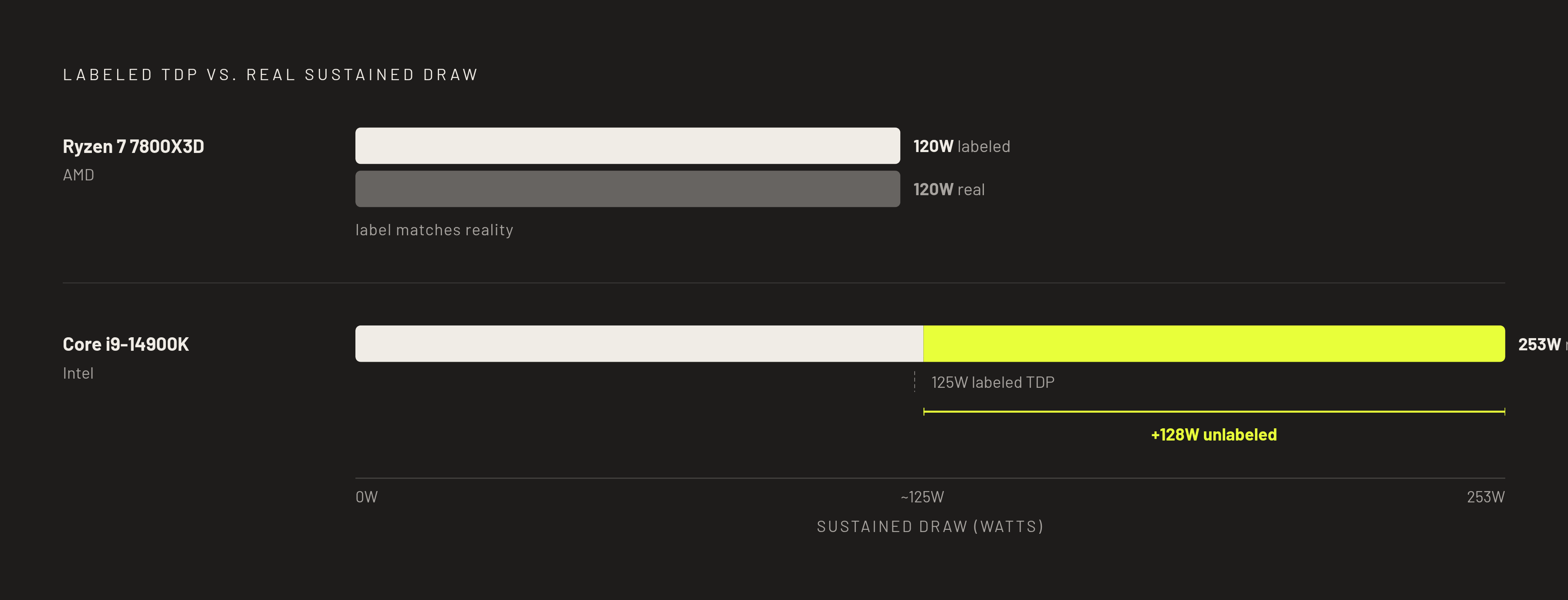
The gap between labeled and actual power draw doesn't stop at the CPU. Enthusiast motherboards frequently ship from the factory with power limits set to "unlimited," or set well above the chip manufacturer's reference specification, because looser limits produce better numbers in multi-core benchmarks. That default setting means the exact same CPU, carrying the exact same box TDP, can draw a noticeably different amount of sustained power depending on which board it's dropped into and how aggressively that board's firmware was tuned out of the box. AMD's Ryzen 7 7800X3D runs around 120W sustained, but Intel's Core i9-14900K reaches roughly 253W under AVX-512 load, so two chips that look similar on a spec sheet can need entirely different cooling once installed. If you reset power limits in BIOS back to the CPU manufacturer's reference values, real draw pulls back toward the labeled figure, and you give up a small amount of multi-core benchmark performance for meaningfully lower sustained temperatures. That trade matters enough to come back to once a cooler is already in hand and running hotter than expected.
Why cooler TDP ratings are measured under conditions your build won't replicate
CPU TDP isn't the only number on a spec sheet standing in for something narrower than it looks. If cooler manufacturers disclose their methodology, they generally test using a heater block or dummy load that simulates CPU die output at a steady, controlled wattage, under a controlled ambient temperature, against a target temperature ceiling the company sets itself. Most manufacturers don't publish their exact testing conditions, and the approaches that do get disclosed vary enough between brands that a rating from one company tells a builder very little about a rating from another. Manufacturers don't disclose much, so some coolers carry TDP ratings that look implausible against real sustained loads, because the heat a cooler can move depends heavily on the ambient temperature and test rig behind the number. A cooler's TDP rating is still useful for one purpose: ranking coolers against each other within the same manufacturer's own lineup, tested under that manufacturer's own methodology. It stops being useful the moment it's treated as a hard pass or fail line against a CPU's labeled TDP, because neither side of that comparison was measured the same way or under conditions a real build will reproduce.
What the gap between labeled and real numbers means when a cooler runs near its ceiling
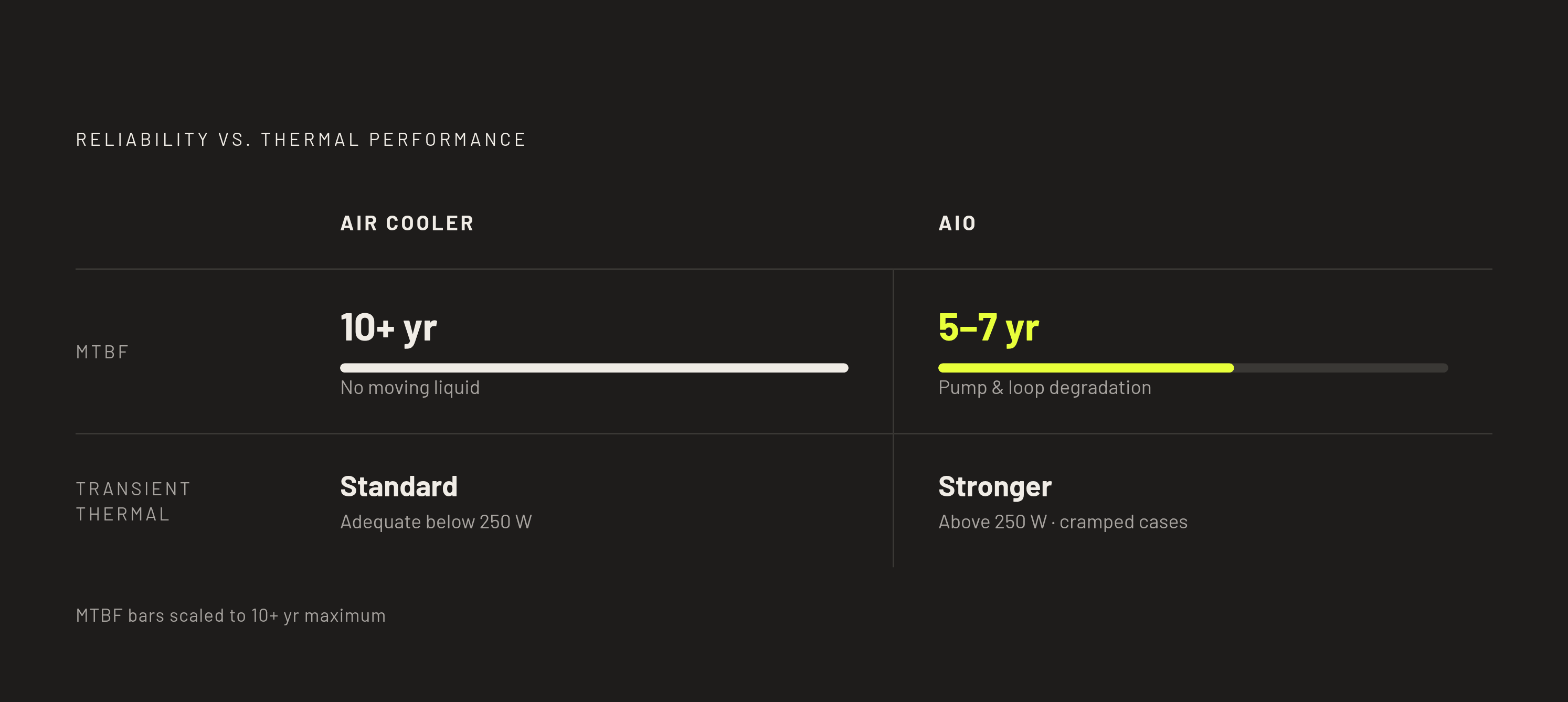
Putting the two mismatches together, if you pair a cooler rated for a given wattage under idealized bench conditions with a CPU whose actual sustained draw sits close to that rating, the cooler ends up running near its ceiling, not with the comfortable margin the two labels seemed to promise. The pairing looked correct on paper because neither labeled number reflected how the parts would actually behave together, which produces the familiar complaint of a "technically compatible" cooler whose fans spin at high RPM while the CPU still throttles against its thermal limit. This mismatch is most severe in small-form-factor builds, where a CPU carrying a modest labeled TDP gets matched to a cooler sized around that same modest number, inside a case that only has room for fewer or smaller fans, and where the ambient air inside that case runs hotter than an open test bench ever would. AIO liquid coolers offer an advantage in exactly this kind of squeeze: their transient response is stronger than air cooling, most visible above 250W TDP and in cramped cases where a top-mounted radiator can route around airflow bottlenecks that would choke an air tower. But that advantage comes with a tradeoff in long-term reliability: quality air coolers run a mean time between failures of 10 years or more, against roughly 5 to 7 years for AIOs.
Sizing a cooler against actual sustained power draw rather than labeled TDP
Sizing a cooler correctly starts by throwing out the label entirely and measuring what the CPU actually draws. The number that matters is the CPU's actual sustained all-core power draw at the power limits the motherboard is configured to allow, not the figure printed on the retail box, and tools such as HWiNFO64 can surface that number directly under a real workload. Once that real figure is in hand, size the cooler against it with headroom built in: for Ryzen 7000 or Intel 14th-generation CPUs, adding roughly 15% headroom over measured draw is a reasonable margin, and a 150W-rated cooler sitting on a 125W CPU is a safer bet than a 130W-rated cooler on the same chip, even though both coolers advertise support for 125W parts. Once two coolers clear that sustained-load bar, the more useful way to choose between them is noise-normalized performance, meaning how much heat each one removes at the same acoustic output, which is the comparison the better cooler reviews run. Any rating that matters should come from independent sustained-load testing rather than a manufacturer's own specification sheet, because a trustworthy cooler rating means the unit holds a chip of that measured draw under its target temperature across a full sustained load in a standard ATX case with moderate airflow. For a builder who finds their CPU already pushing against the practical ceiling of the cooler they own, resetting motherboard power limits back to the CPU manufacturer's reference values is worth doing before spending money on a bigger cooler, since it can bring real draw back in line with what the existing cooler was actually rated to handle.
Socket compatibility as a physical layer separate from wattage matching
Matching wattage correctly solves only half the problem, because a cooler also has to physically attach to the board, and that question has its own separate set of rules. Socket compatibility asks two distinct things at once: can the cooler's mounting hardware actually bolt onto the board's retention mechanism, and does that mounting hardware meet the platform's current mechanical specification once it's attached. Those two questions can give you different answers for the same pair of parts. AM4 and AM5 share an identical 54mm by 90mm bolt pattern, so most coolers built for AM4 will mount on AM5 boards if you have the correct backplate, and Intel's LGA1700 and LGA1851 sockets share a mounting hole pattern much the same way, so a lot of coolers list support for both platforms using identical hardware. Intel has since raised the minimum mounting pressure required for LGA1851, with the Dynamic Compressive Maximum nearly doubling from 489.5 N to 923 N, so an older cooler can physically fit the new socket's holes but still not meet the pressure that socket now requires, unless it ships with an updated mounting kit. A "socket compatible" label on a product page can mean nothing more than that the screw holes line up, without confirming that the mounting hardware behind those holes satisfies the platform's current spec, a distinction that carries real weight on any LGA1851 build.
How manufacturers handle socket transitions
Manufacturers have taken different approaches to closing that gap, and those approaches show you what a genuine compatibility confirmation looks like next to a bare assumption. ARCTIC guaranteed that every Intel LGA1700-compatible ARCTIC cooler can be used without restriction on Intel's LGA1851 socket, a direct statement rather than an inference drawn from shared hole spacing. Enermax took a different route, offering upgrade kits that provide full compatibility with both LGA1851 and LGA1700 across an existing cooler lineup that includes the AQUAFUSION, LIQMAX III, ETS-F40, and ETS-T50 AXE. The practical rule that falls out of both examples is straightforward: a builder moving from LGA1700 to LGA1851, or from AM4 to AM5, should look for the cooler manufacturer's explicit statement on the new socket rather than assume compatibility from the fact that the hole pattern matches. Confirming physical mount support means checking the specific platform generation in question, whether that's LGA1700 covering 12th through 14th Gen chips, LGA1851 covering the Core Ultra series, or AM5 covering the Ryzen 9000 series and earlier AM5 generations, and treating any adapter as something to test or confirm.
Physical clearance problems that socket compatibility checks miss entirely
A confirmed socket match still leaves a separate category of fitting problems unaddressed. Large dual-tower coolers, and some single-tower designs as well, overhang the RAM slots next to the socket, and on both AM5 and LGA1851 boards some high-performance coolers physically block the first DIMM slot, which makes RAM height a hard constraint standing alongside cooler height. To check RAM clearance, measure from the socket to the top edge of the first DIMM slot and compare that distance against the cooler's overhang, because RAM modules taller than roughly 45mm can fail to fit under certain coolers regardless of how well the cooler otherwise matches the socket. AIO coolers carry a parallel version of the same problem: cases often advertise support for a 360mm radiator in their spec sheet without specifying how much usable radiator space actually exists inside, so builders reasonably assume any 360mm AIO will fit, and then run into clearance issues once the radiator is actually in hand during installation. Treat motherboard VRM heatsink height, RAM slot clearance, and total case height as three separate checks rather than one combined assumption, because a 160mm tall cooler will not fit inside a case with 155mm of clearance no matter how correctly that cooler matches the socket and the wattage.
Mounting quality and installation determine whether rated performance is delivered
Every check up to this point can be done correctly and still leave the build short of the cooler's rated performance, because installation technique is the final variable standing between a correct match and the temperatures that match is supposed to deliver. Mounting pressure and contact quality decide whether a cooler's rated thermal capacity ever shows up in practice: if the cooler sits unevenly or the pressure across the CPU's surface isn't consistent, heat transfer suffers no matter how capable the cooler is or how good the thermal paste. If you tighten mounting screws out of sequence, rather than in a cross pattern that distributes pressure evenly, you degrade contact quality, and nothing will look wrong to tell you it happened. Cold plate position relative to the CPU's primary hotspot matters more on modern CPUs than it once did, and if you offset the cold plate toward that hotspot rather than centering it, you get a measurable temperature reduction, typically 1 to 3°C, over a standard centered mount. Intel's near-doubling of the required mounting pressure for LGA1851 makes correct torque and even seating matter more on that platform than it did on LGA1700 or earlier Intel sockets, since the margin for a loose or uneven mount has shrunk even as the pressure requirement has grown.
Confirmed compatibility and realistic TDP headroom across current platforms
Once you run the full framework together, it changes the question you should actually be asking before buying a cooler. The comparison was never whether a cooler's rated TDP meets a CPU's labeled TDP; you need to know whether that cooler meets the CPU's real sustained draw with meaningful headroom, confirmed against the exact socket the build uses, with clearance checked and the mounting kit matched to the platform's current spec. ARCTIC's blanket LGA1851 guarantee and Enermax's upgrade kits for the AQUAFUSION, LIQMAX III, ETS-F40, and ETS-T50 AXE both show what a genuine compatibility confirmation looks like against a bare assumption drawn from matching screw holes. Planning tools built around 3D configurators make most of these variables visible before a single part is purchased, since socket compatibility, cooler dimensions against case clearance, and RAM height conflicts can all be caught while a build is still on paper rather than discovered on installation day, which is exactly where a TDP mismatch or a mounting error costs the most time and money to fix.


