Best PC Cases for Airflow Under $100
Mesh fronts and fan placement beat price when thermal performance matters most.

Summary
Mesh fronts and fan placement beat price when thermal performance matters most.
Modern GPUs pull well over 300 watts and dump that heat into a chassis no matter what the case cost. That single fact has forced a real change in how budget cases get built, and it's why a thermal-first ranking of sub-$100 cases is worth writing at all. Cases in this price band now ship with tempered glass panels, multiple pre-installed ARGB fans, and cable management that actually works, features that used to show up only in far pricier builds.
None of that matters if the case still chokes its own intake. A builder who understands which design choices move temperatures can get genuine thermal engineering at this price point, without paying a premium for it. The ranking that follows starts from that premise: price and thermal performance in this segment no longer track each other in any simple way, and the cases that win here earn it through specific, checkable design decisions.
The design variables that determine airflow performance
Three things decide how a case performs thermally: how open the front panel is, whether the fans are mounted in a way that creates a clear front-to-back airflow path, and how much clearance sits between the GPU and its intake fans. Front panel openness is the biggest single lever in that group.
A mesh front panel lets intake fans pull cold air in with almost no resistance. A solid or tempered glass front blocks a large share of that same air, so the fans have to spin harder and hotter just to move a comparable volume through the case. Testing from GamersNexus and other independent labs, across dozens of cases, generally shows mesh fronts beating glass fronts on temperature, though the size of that gap swings widely by case, from barely measurable to more than 10°C, and isn't automatically decisive on its own. The trade-off runs the other direction on noise: an open mesh front lets more fan sound escape along with the air, and it collects dust faster. The be quiet! Light Base 600 LX, with its glass front, shows what a closed front buys in quiet operation, at the cost of meaningfully higher GPU temperatures.
Fan count and quality at the point of purchase matter more than most builders expect. Four decent fans included in a budget case will outperform two mediocre fans in a pricier one, because the total volume of air moving through the case is what actually reaches the GPU and carries heat away. Clearance between the GPU and its intake fans matters just as much, especially for high-TDP cards. Cases built with bottom-mounted intake fans or generous internal clearance give the GPU a dedicated supply of cold air instead of forcing it to breathe warm air that's already circulated past other components.
Back-connect compatibility has become a spec worth checking before you buy rather than after. Builders considering an ASUS BTF or similar rear-connector motherboard need a case with a tray cutout that lines up with that standard, and not all cases in this segment offer it. Planning fan placement, GPU clearance, and cable routing in three dimensions before a single part ships saves a builder from finding out mid-build that a motherboard doesn't fit the case it was paired with, and these three variables, plus that one compatibility check, form the framework the rest of this ranking applies to every case below.
Lian Li Lancool 207 (~$80): the benchmark thermal leader
GamersNexus calls it the Best Sub-$100 Case in its Best PC Cases of 2025 round-up, and independent testing across a large sample of cases confirms the thermal lead: CPU and GPU temperature deltas above ambient are the lowest recorded in this price band. The specific numbers are a CPU delta of 38.1°C and a GPU delta of 38.2°C above ambient, the lowest pairing in the entire ranking.
The mechanism behind that result is a sideways-mounted PSU, which frees up the entire front intake for two 120mm fans that pull air directly across expansion cards instead of competing with the power supply for airflow. The case ships with four fans pre-installed, including an infinity-mirror effect built into the front units, so the thermal win doesn't come at the expense of visual impact.
The honest caveats matter as much as the benchmark numbers. Cable management is a genuine struggle here: closing the right-side panel gets difficult once a build involves more cables or thicker sleeving, and the sideways PSU orientation complicates both power supply length and routing. GamersNexus itself names the Fractal Meshify 3 as its overall best case, which confirms that leading on thermals doesn't automatically make a case the right choice for every builder. That distinction, thermal leader versus best overall, is the frame for every case that follows.
Phanteks XT Pro Ultra (~$80): the second-best cooling result with future-proofing built in
The Phanteks XT Pro Ultra trails the Lancool 207 on raw thermal numbers, but it offers something the category leader doesn't: support for rear-connector motherboards. For a builder planning a back-connect build, that single spec can outweigh a few degrees of thermal margin, which is what makes second-best cooling into the better overall choice for that specific use case.
The case's motherboard tray cutout pattern supports ASUS BTF, MSI Project Zero, and Gigabyte Project Stealth boards, built around a design approach that Maingear is promoting as the MG-RC standard, with Phanteks as a partner on it. That spec matters more with each passing product cycle as rear-connector boards move from a niche feature to a mainstream option. The XT Pro Ultra ships with four pre-installed 140mm fans and an ultra-fine mesh front designed specifically for thermal efficiency, and that combination lands it second on cooling performance in this ranking. For builders not planning a rear-connector build, the Lancool 207 still wins on pure thermals. For builders who are, the XT Pro Ultra is the one to buy.
Montech AIR 903 MAX (under $80): the best-value airflow case for most builders
Most builders shopping in this segment are looking for strong, genuine airflow rather than the single lowest thermal delta available. They're looking for a case that delivers strong, genuine airflow without the unconventional layout of the Lancool 207 or the price premium of the XT Pro Ultra, and that's the gap the Montech AIR 903 MAX fills.
It ships with four pre-installed 140mm fans (three ARGB, one PWM), a mesh front panel with a high ventilation rate, and GPU clearance up to 400mm, a set of specs that's competitive across every dimension that actually drives airflow. It also includes dust filters, among them a magnetic top filter, plus a built-in LED and PWM controller hub, both of which cut into the accessory spending that usually follows a budget case purchase. Multiple independent test sources name it the top budget airflow pick in its cohort, and it earns that ranking through fan count and mesh design rather than marketing language. Priced below both the Lancool 207 and the XT Pro Ultra, it's the clearest value-per-thermal-dollar result in this entire ranking.
Community hardware surveys that track which cases and GPUs builders are actually buying each month show the AIR 903 MAX sitting right in the middle of real-world purchase behavior. That's a useful signal for anyone wondering whether a case's benchmark performance translates into how people actually build with it.
Montech X3 Mesh (under $70): the RGB-forward mesh pick for aesthetic-first builders
Not every builder is optimizing purely for the lowest temperature delta. Some want a case that looks like a finished showpiece on a desk, and the Montech X3 Mesh answers that brief without giving up the mesh-front thermal advantage that defines this entire ranking.
It ships with six pre-installed RGB fans, a notably large bundle at this price when most competitors in the same tier include only two or three. Panoramic tempered glass keeps the build visible from multiple angles, a detail that matters for desk aesthetics and lines up with the broader 2026 shift toward showcase-style builds. The mesh front still preserves an airflow advantage over solid or glass-front competitors, even though the panoramic glass panel on the side does introduce a small thermal cost relative to a fully open chassis. The case is effectively proof that RGB and airflow aren't a binary choice in 2026's budget segment. Builders don't have to sacrifice one for the other here.
Silverstone FARA 515XR (~$75–$85): the honest budget pick when $70 is the real ceiling
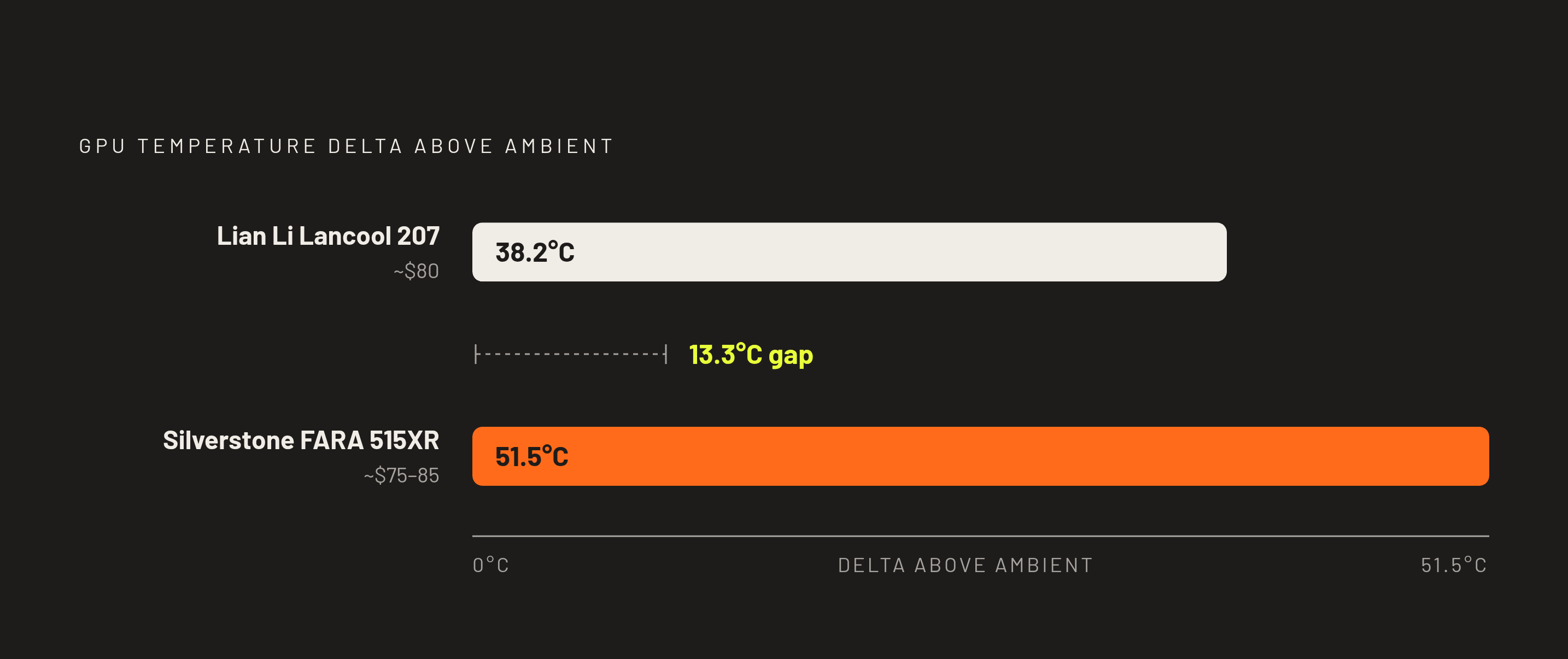
For builders working with a genuinely fixed budget near $70, the Silverstone FARA 515XR is the best-tested mesh case available at that price point. The thermal data shows a real gap between it and the top picks in this ranking, one to understand clearly before choosing on price alone.
The CPU delta is 48.4°C and the GPU delta is 51.5°C above ambient, meaningfully higher than the Lancool 207's 38.1°C and 38.2°C results. That difference illustrates something important about this entire price segment: the price tiers within the sub-$100 band track real thermal differences, not just marketing segmentation. A builder paying around $80 for the Lancool 207 gets the best thermal result in this ranking, while the Phanteks XT Pro Ultra at roughly $80 offers the second-best cooling result along with back-connect motherboard support.
Whether that gap matters in practice depends heavily on the GPU going into the build. Community data lets builders weigh whether this thermal gap actually matters for their own GPU choice. For a build centered on a card like that, the FARA 515XR's extra thermal delta is far less consequential than it would be paired with a higher-TDP card. A builder who knows their own GPU's power draw before evaluating this case's numbers can make an informed trade-off instead of a disappointing one.
Cooler Master MasterBox Q300L ($39.99): what ultra-budget airflow looks like
At $39.99, the Cooler Master MasterBox Q300L is at the very bottom of this ranking's price range, and it earns its spot on thermal merit rather than on price alone. It's also the case in this list that asks the most of a builder willing to spend a little more after the initial purchase.
Its design perforates virtually every surface, including the top, bottom, front, and side panels, giving air nearly unobstructed movement through the entire chassis. In testing, its thermal results rivaled cases costing several times as much. It supports 240mm liquid cooling and up to five fans total, and it has built up a large number of reviews on Amazon, a sign of broad validation from real builds rather than lab conditions alone. Its form factor is Micro-ATX, which is the real limiting factor here: builders working with a full ATX board need to look higher up this ranking, since the Q300L only makes sense for smaller builds where that footprint trade-off is acceptable.
The case ships with just one pre-installed 120mm rear fan, so its low price comes with an implicit second cost: a separate fan budget is required to actually realize the thermal potential that all that perforation promises. The case that fits best isn't necessarily the one with the lowest temperature delta on a spec sheet. It's the one that matches a builder's form factor, fan budget, and GPU's power draw all at once.
The acoustic-thermal trade-off that the spec sheets won't tell you
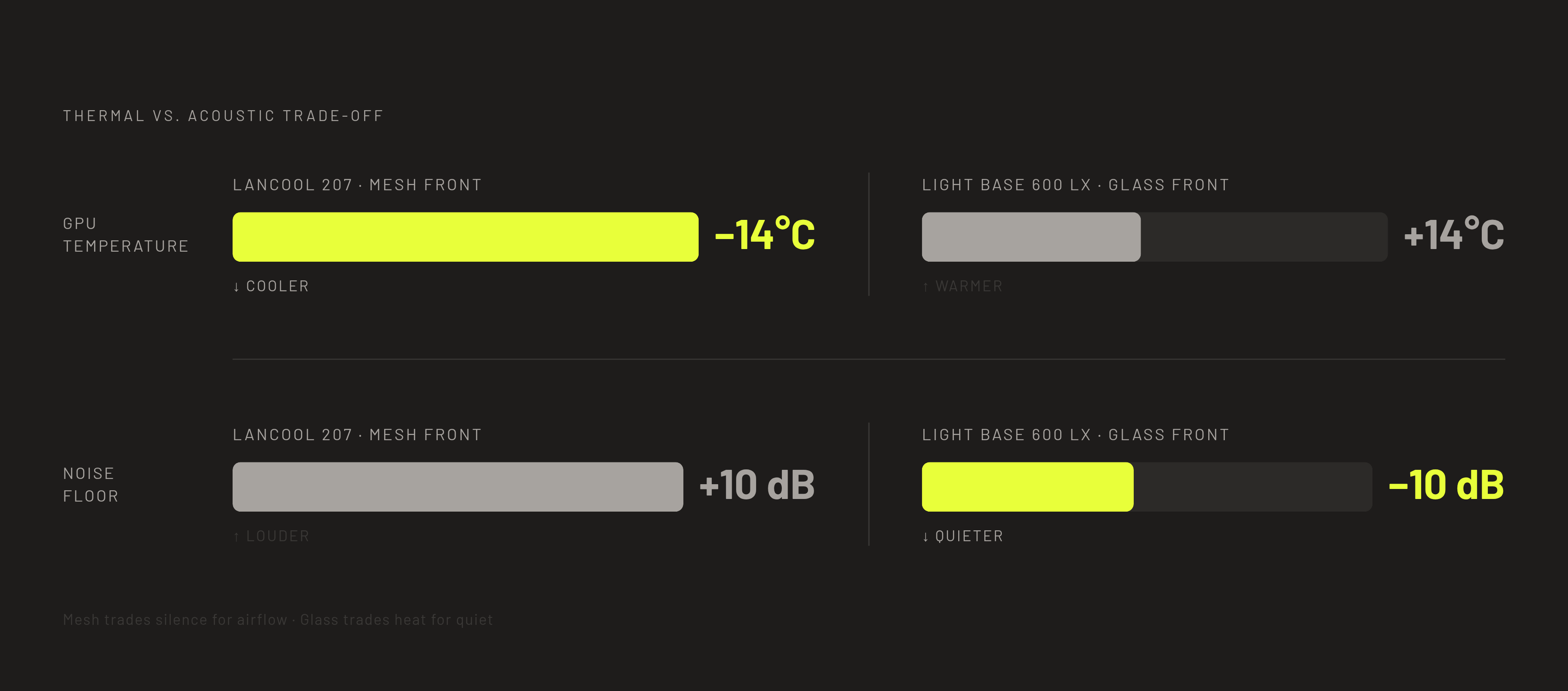
Choosing a mesh-front case over a glass-front design is a real acoustic trade-off, not a free upgrade, and builders working in quiet environments need to weigh that before committing to any of the thermal-first picks above.
The be quiet! Light Base 600 LX, with its glass front, posts a noise floor more than 10 dB below the mesh-front Lancool 207. That's a substantial, audible difference in a quiet room. But its GPU runs roughly 14°C hotter than the Lancool 207 under load, a gap that will matter a great deal to anyone running a GPU near its thermal limit and matter far less to someone who isn't.
Neither case is the wrong choice. The mesh-front case is the right answer for a builder prioritizing sustained GPU boost clocks under sustained load. The glass-front case is the right answer for a builder in a quiet room running a GPU that never pushes close to its thermal ceiling. Every case in this ranking comes down to which trade-off, thermal headroom or acoustic comfort, actually matches the build in front of you.
Sources
- Best PC Cases of 2025: $75 to $200 Airflow, Thermals, Cable Management, & Budget
- 8 Best Airflow PC Cases Under $100 (September 2026)
- Montech Air 903 MAX Mid-Tower Case Review
- Montech Air 903 Max Case Review: Maximum thermal performance on a budget
- Lian Li Lancool 207 Airflow Case Review
- Montech X3 Mesh Review
- Best PC Cases 2026: Our Tested Picks for Your Next Build
- 2026 PC Case Trends: Panoramic Views, Back-Connect Builds, and High Airflow - Future Trends - ACEGEEK


