Best NVMe SSDs for Gaming PCs by Capacity
Modern games demand more storage than ever, making capacity the key factor in choosing your drive.

Summary
Modern games demand more storage than ever, making capacity the key factor in choosing your drive.
Best NVMe SSDs for Gaming PCs by Capacity.
Why capacity is the right starting point for picking a gaming SSD in 2026
Picking the right NVMe SSD for a gaming PC starts with a question of size. The old rule, buy the fastest drive the budget allows, stops being useful advice once you look at what's actually happening in the market. PCIe 4.0 and PCIe 5.0 drives now cost roughly the same, so the generation you pick matters less than how much room you actually need for the games you want to keep installed.
And the games keep getting bigger. A full install of Call of Duty now runs past 300GB, Microsoft Flight Simulator with its add-ons tops 200GB, and Cyberpunk 2077 with its expansion crosses the 100GB mark. Windows 11 takes a bite out of a drive before any of that even loads, consuming around 60GB on its own. Titles built around DirectStorage stream assets directly off the SSD, so the drive now shapes texture pop-in and load behavior in real time, not just how fast the desktop appears at boot. Capacity, in other words, decides how many of those titles can live on the drive at once.
That's the spine of this guide: each capacity tier, 1TB, 2TB, and 4TB and up, has a natural home with a specific kind of builder and a specific kind of budget. None of them is objectively "best." Each solves a different problem. The timing matters because NAND pricing climbed through late 2025 into 2026 on the back of memory-shortage pressure tied to AI industry demand, which makes the trade-off between capacity and cost a live decision rather than an academic one. Comparing prices in real time while configuring a build shows exactly where that trade-off lands for a given budget.
What the Steam community's actual storage situation reveals about each capacity tier
Just under half of surveyed Steam PCs, 49.51%, report more than 1TB of total storage, and the largest single segment below that, at 24.67%, is in the 750GB to 999GB range. Reading those two numbers together shows a pattern: a huge share of active gaming PCs are still running on storage that a single modern AAA install can meaningfully dent.
The free-space numbers make the pressure concrete. The most common amount of free space reported across surveyed Steam PCs is between 100GB and 249GB, at 23.98%, and another 16.80% of systems have less than 100GB free at any given time. Add those together and roughly four in ten Steam PCs are operating with less free space than a single big install requires. That's a condition already pressing on the present. It's the condition a large chunk of the Steam community is already living in.
That data lines up with what Tom's Hardware said: "2TB drives represent the sweet spot, with 4TB models becoming increasingly common." The survey numbers back it up rather than just repeating it. Once the tension between installed capacity and free space becomes visible at this scale, the case for each tier gets easier to make on its own terms. The Valve Steam Hardware Survey is cited explicitly as the source for what the Steam community's actual storage situation reveals about each capacity tier.
The 1TB tier: who it still makes sense for
Set the expectations correctly here: 1TB is a floor, not a recommendation. It's the practical minimum for any gaming build priced above roughly $500, the point below which corners start getting cut in ways that appear during actual play. On a 1TB drive, the operating system and background apps eat into the total before a single game arrives, leaving space that's realistically comfortable for a rotating library of older or lighter titles, or a small, curated set of current AAA games rather than a sprawling one.
There are still legitimate reasons to land here. Budget builds that prioritize a fast Gen 4 boot drive, paired later with a cheaper secondary drive for the bulk of the library, make good use of 1TB as the primary drive rather than the only one. Compact ITX builds with a single M.2 slot and a firm price ceiling are another honest fit, since there's often no room, physically or financially, for a second drive.
On the budget end, the Kingston NV3 1TB costs around $155 and functions as the entry point for this category, while the Crucial P310 1TB, at roughly $175, is as close to a speed ceiling as the budget 1TB tier gets.
Where 1TB runs out of road is straightforward and not some edge case reserved for extreme users. A single large modern title like Call of Duty, north of 300GB on its own, combined with Windows and even one more sizable game, can fill the drive completely. That's a common case for anyone building a rotating library, which is exactly the case for moving up a tier. Budget DRAM-less drives like the WD SN580 show game load times within roughly 1 second of DRAM-equipped drives per the research brief, so the performance penalty at 1TB budget is smaller than spec sheets imply.
The 2TB tier: the drives most builders should buy
Tom's Hardware said in August 2026 that 2TB drives are the sweet spot. The number backs itself up once you do the math. At 2TB, a builder can hold Windows, the usual pile of background apps, and a rotating library of fifteen or more mixed-size titles with real headroom left over, and the difference from a 1TB drive is felt immediately, then keeps being felt every time a new game gets installed without a deletion negotiation first. Prices have climbed off their 2025 lows because of the NAND shortage, but 2TB Gen 4 drives remain within reach for mid-range builds, which keeps this tier from becoming a luxury purchase.
GamesRadar's own testing came in close to those numbers, at 7,462 MB/s read and 6,877 MB/s write, and found it ran cooler than Gen 5 competition, backed by a five-year warranty and Samsung's Magician software GamesRadar+. Newegg's guide, notably, recommends the 990 PRO as the best all-rounder at 1TB but shifts its favor to the standard Samsung 990 (non-PRO) once you're shopping at 2TB, which is worth knowing before assuming the Pro badge is always the right call GamesRadar+.
The WD_BLACK SN850X 2TB runs a close second, rated at 7,300 MB/s read and 6,600 MB/s write, with an optional RGB heatsink version and broad PS5 compatibility Newegg. Its Game Mode 2.0 feature came across as unfinished in testing, something WD has pointed to future firmware updates to address, though the five-year warranty holds regardless Newegg. The WD_BLACK SN7100 2TB takes a different approach entirely: it's single-sided, skips the DRAM cache, and runs on Kioxia's 218-layer BiCS8 TLC NAND, yet it matches or beats the SN850X on random 4K reads in some tests. That metric governs how fast maps, assets, and save files load. PC Gamer flags it as the metric that counts. Tom's Hardware also names the SN7100 the best M.2 SSD for laptops, making it a solid call for slim-slot builds too.
For builders on current-generation boards who want to future-proof, Gen 5 options exist at 2TB without a brutal price jump GamesRadar+. The Crucial T700 2TB with heatsink runs around $235, delivering Gen 5 speeds at twice the capacity of a 1TB Gen 5 drive for less money than some 1TB Gen 5 options cost outright. Dong Knows Tech, in a piece updated September 14, 2026, points to the related Crucial P510 as Micron's third PCIe Gen 5 SSD and the first one built as a mainstream drive, with the best performance-to-cost ratio the Gen 5 tier has seen so far. The WD Black SN8100 earns similar praise from reviewers as one of the fastest PCIe 5.0 drives on the market while running notably cool for its class.
The decision rule for this tier is simple: if the choice comes down to a 1TB Gen 5 drive versus a 2TB Gen 4 drive at similar prices, take the capacity. Game loads are functionally identical across generations in most cases, and space is the constraint that will actually bite. Comparing the 2TB options side by side while configuring a build makes this trade-off easy to see rather than something you discover after the fact. Top Gen 4 picks at 2TB. Gen 5 at 2TB, for builders on current-gen boards who want to future-proof.
How much the PCIe generation matters for gaming load times
On paper, the gap between generations looks enormous. In a game, that gap mostly disappears. Tom's Hardware's game-load testing on a current Gen 5 flagship found an average improvement of about 0.05 seconds over Gen 4, which works out to roughly one percent. PCWorld's numbers tell a similar story: a Gen 5 drive loaded Counter-Strike 0.44 milliseconds faster than its Gen 4 counterpart, and Cyberpunk 2077 came in about a second faster.
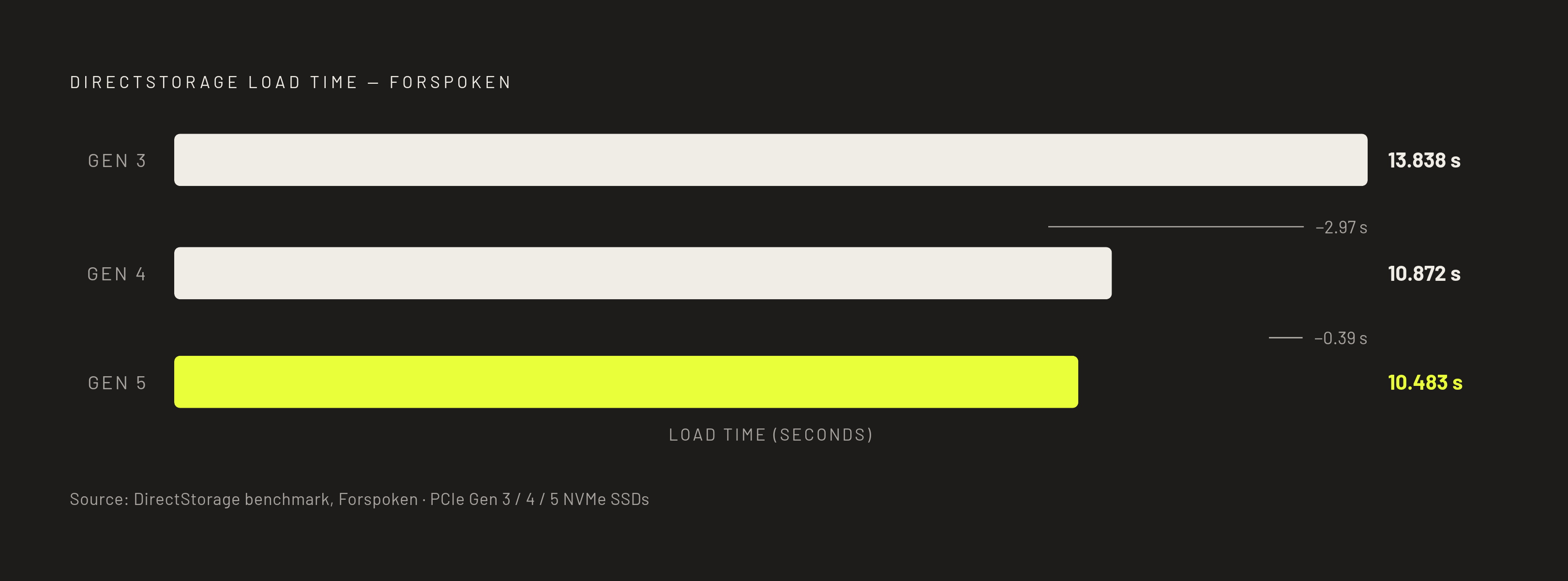
DirectStorage testing in Forspoken sharpens the point further. Gen 5 loaded the title in 10.483 seconds against 10.872 seconds on Gen 4 and 13.838 seconds on Gen 3. Looking at those numbers closely, the bigger jump sits between Gen 3 and Gen 4, not between Gen 4 and Gen 5.
PCIe 4.0 and 5.0 drives now coexist at overlapping price points, making the choice of generation less important than how much space you actually need. That's a real, usable difference for anyone moving large video files or working with big creative projects.
Microsoft's DirectStorage standard is still catching up to the hardware. Version 1.4 arrived at GDC 2026 with Zstandard compression and a multi-tier decompression setup, and GPU vendors have driver work landing through the year, but adoption of titles actually built around it remains limited as of Newegg's August 2026 guide, and Microsoft hasn't published a confirmed list of supported games. Gen 5 drives also run hotter, generally ship with or require a heatsink, and need a PCIe 5.0 M.2 slot to hit rated speeds, standard on AMD's X670 and X870 boards, present on only some Intel Z790 boards (where it competes with the GPU for lanes), and standard on Z890. A Gen 5 drive dropped into a Gen 4 slot simply runs at Gen 4 speeds, a safe fallback rather than a compatibility failure.
The practical synthesis: for pure gaming, spend the money on capacity, not generation. For mixed workloads, video editing, moving large files regularly, or DirectStorage-heavy titles whenever they actually arrive in numbers, Gen 5 justifies its premium. PCIe 4.0 tops out around 7,000–7,500 MB/s sequential reads while PCIe 5.0 pushes past 14,000 MB/s, making the headline gap look dramatic. Gamers Nexus and Hardware Unboxed benchmarks consistently show under 2 seconds of load time difference between Gen 4 and Gen 5 NVMe in gaming. Where Gen 5 genuinely doubles Gen 4 is bulk sequential work, as StorageReview measured a Gen 5 flagship at roughly 15 GB/s read and 14.1 GB/s write in burst versus roughly 5,200–5,800 MB/s for top Gen 4 drives in equivalent video-editing tests.
The 4TB tier: large libraries, content creation, and the value case for going big
Choosing the right NVMe SSD for a gaming PC starts with capacity, not spec sheets, and each capacity tier (1TB, 2TB, and 4TB+) has a clear sweet spot matching a distinct type of builder and build budget. This is someone running a large Steam library kept permanently installed, recording gameplay sessions or streaming regularly, often doing content creation or storing large media files alongside the games themselves. It's also, frequently, someone who has already run out of space once before and has no interest in playing that rotation game a second time.
The timing favors this decision more than it used to. 4TB drives have dropped significantly in price recently, and by the research brief's own description, good deals are genuinely common now, a shift from the pricing seen at the 4TB SSD's original launch. The Samsung 990 PRO 4TB carries the same rated speeds as its 2TB sibling, 7,450 MB/s read and 6,900 MB/s write, and GamesRadar calls it, without much exaggeration, a monster of the storage world at this size, backed by the same five-year warranty and Magician software support GamesRadar+. The WD Blue SN5000 4TB takes the value crown in GamesRadar's assessment, built with content creators in mind while still delivering fast speeds without the flagship price tag Newegg.
PCIe 4.0 and 5.0 drives now coexist at overlapping price points, closing the gap further at this capacity. The BIWIN NV7400 still delivers over 7,400 MB/s while costing roughly half what the flagship drives charge. At 4TB, that per-terabyte cost gap between budget and flagship drives widens considerably compared to 1TB or 2TB, which makes the case for a mid-tier 4TB drive over a flagship one noticeably stronger here than at either smaller tier.
None of this means every gaming PC needs 4TB. Treat it as a configuration choice for a specific kind of use case, content creation, streaming, permanently-installed libraries, rather than a universal upgrade every build should aim for. Builders chasing 4TB are frequently the same people thinking about a full desk setup for streaming or creation work, and visualizing that whole arrangement in 3D before buying anything tends to be worth the extra step. Top 4TB picks.
When two drives beat one: the split-drive strategy for upgraders and budget builders
Sometimes the better answer isn't one big drive, it's two smaller ones working different jobs. A fast NVMe drive for Windows and the games in active rotation, paired with a cheaper secondary drive for the backlog and file storage, frequently beats a single large premium drive on value grounds.
The cost of the upgrade stays low, and the performance gain on whatever's actively being played is visible immediately, no migration of the entire library required.
Budget builders can run a similar play from the start. Pair a mid-range 1TB Gen 4 drive, something like a Samsung 990 PRO 1TB or a WD_BLACK SN850X 1TB, with a high-capacity budget drive like the Crucial P3 Plus to hold the backlog Newegg. The P3 Plus tops out around 5,000 MB/s read and 4,200 MB/s write, slower than the flagships but plenty for games that aren't being actively played, and its QLC NAND is a fine trade-off in a secondary role where write endurance matters less Newegg. The WD SN580 works well in that same secondary slot too, since its game load times are within about a second of DRAM-equipped drives, a gap small enough not to matter for titles sitting in the backlog.
This is also where the earlier 1TB-Gen-5-versus-2TB-Gen-4 decision resurfaces, and the split-drive approach makes the right call even more obvious: take the capacity, because a second drive can always absorb whatever the primary can't, and space, not generation, is what actually runs out first. In the upgrader path, keeping the existing drive (even a Gen 3 or SATA) and adding a fast 1TB or 2TB Gen 4 drive as the boot and primary game drive lowers the cost of the upgrade while delivering an immediate performance gain on active titles.
Sources
- Best SSD for gaming 2026: The best performing drives for your PC | GamesRadar+
- Best NVMe SSDs: 2026's Top Five | Dong Knows Tech
- Best SSDs 2026: From blazing-fast M.2 NVMe down to budget SATA | Tom's Hardware
- Best NVMe SSDs for Gaming in 2026
- Steam Hardware & Software Survey: August 2026
- Best M.2 SSDs for gaming in 2026: my top picks for blazing fast storage | PC Gamer
- Best SSDs of 2026: Budget, premium, SATA, NVMe, and more | PCWorld
- PCIe 5.0 vs PCIe 4.0 SSD: Worth Upgrading in 2026?


