PC Specs Required for Modern Open-World Games at 1440p
Most open-world games now demand 12GB VRAM and midrange GPUs to maintain smooth 1440p performance.

Summary
Most open-world games now demand 12GB VRAM and midrange GPUs to maintain smooth 1440p performance.
Open-world games at 1440p now require a specific and rising set of hardware thresholds, and understanding why each one exists separates a build that lasts from one that shows its age within a year. HP's Gaming Hardware Guide 2026 calls 1440p "the most popular target for PC gamers in 2026," and that designation holds because the resolution delivers a meaningful sharpness gain over 1080p without demanding the GPU sacrifice that 4K still requires. Open-world games are the genre most sensitive to that resolution choice. Their dense, streaming environments reward the texture clarity 1440p provides, and their frame-rate demands punish any hardware that isn't keeping pace. The engines behind these titles now run dense AI simulation, real-time lighting, and ray-traced reflections simultaneously, so GPU and CPU both come under load at once, and the old 1080p hardware floor no longer holds up at any quality setting worth choosing. Building for "1440p open-world gaming" is a narrower and more demanding brief than "1440p gaming" in general, and each component carries a floor specific to this genre and resolution that the sections below establish one at a time.
VRAM: the first component to check for 1440p open-world play
VRAM capacity, not raw shader performance, is the binding constraint on GPU choice for open-world gaming at 1440p. Texture streaming, ray-traced reflections, and large environment rendering push an 8GB card to its limit well before its shader cores become the bottleneck. Open-world titles stream assets continuously as the player moves through the world, and when VRAM runs short, the engine swaps textures to system RAM. That produces the stutter and texture pop-in that 8GB cards increasingly show at high settings. HP's Gaming Hardware Guide 2026 describes 4K as requiring a significantly stronger GPU with ample VRAM, while its mid-range 1440p tier is defined mainly by frame-rate targets of 100 or more FPS; read together, the guide points to 12 to 16GB as the working range for 1440p. The practical floor is 12GB for high settings, with 16GB providing the headroom ray tracing and upcoming titles will need without forcing a texture quality compromise. Cards carrying 8GB of VRAM, including some current-generation options, can still run open-world games at 1440p, but only by reducing texture quality, which undercuts the sharpness gain that is the reason for choosing 1440p over 1080p. Ray tracing makes the VRAM pressure worse: reflection buffers, shadow maps, and global illumination data stack on top of texture usage, turning 12GB into a hard minimum the moment any ray-traced feature gets switched on.
GPU tiers that clear the 1440p open-world bar
The current GPU market for 1440p open-world gaming sorts into three tiers: a capable entry point, a true native 1440p target, and a high-end tier with ray-tracing headroom. The floor of that entry tier requires 16GB of VRAM to stay usable through the next release cycle. The RTX 5060 Ti 16GB is at that entry point, and it delivers capable 1440p performance in current titles because its 16GB of VRAM avoids the bottleneck that 8GB cards on comparable architectures run into. The RTX 5060 Ti's 8GB variant doesn't clear that bar; the 16GB version is the one worth buying for this use case. One tier up, both the RTX 5070 and the RX 9070 carry 16GB of VRAM and function as the true native 1440p targets, each capable of sustaining 100 or more FPS at high or ultra settings. Both support their respective upscaling ecosystems natively, DLSS 4 on the RTX 5070 and FSR 4 on the RX 9070, which matters because frame generation is now baked into how these cards reach their rated performance numbers. At the top, you want the RTX 5070 Ti 16GB for a 1440p build targeting ultra settings with ray tracing enabled, because it gives open-world RT scenes the rendering headroom they need without stepping up to a 4K-class GPU. Builders on older hardware should take note of a hard wall forming at the edge of this market: some recent open-world titles have begun requiring hardware ray-tracing support at launch, and a card predating hardware RT cannot run them, regardless of how strong its shader performance otherwise is. Planning tools like BuildCores' 3D configurator let builders drop any of these GPU tiers into a planned case before buying anything, with a real-time compatibility checker that flags VRAM totals and clearance issues automatically, making GPU selection a visual process.
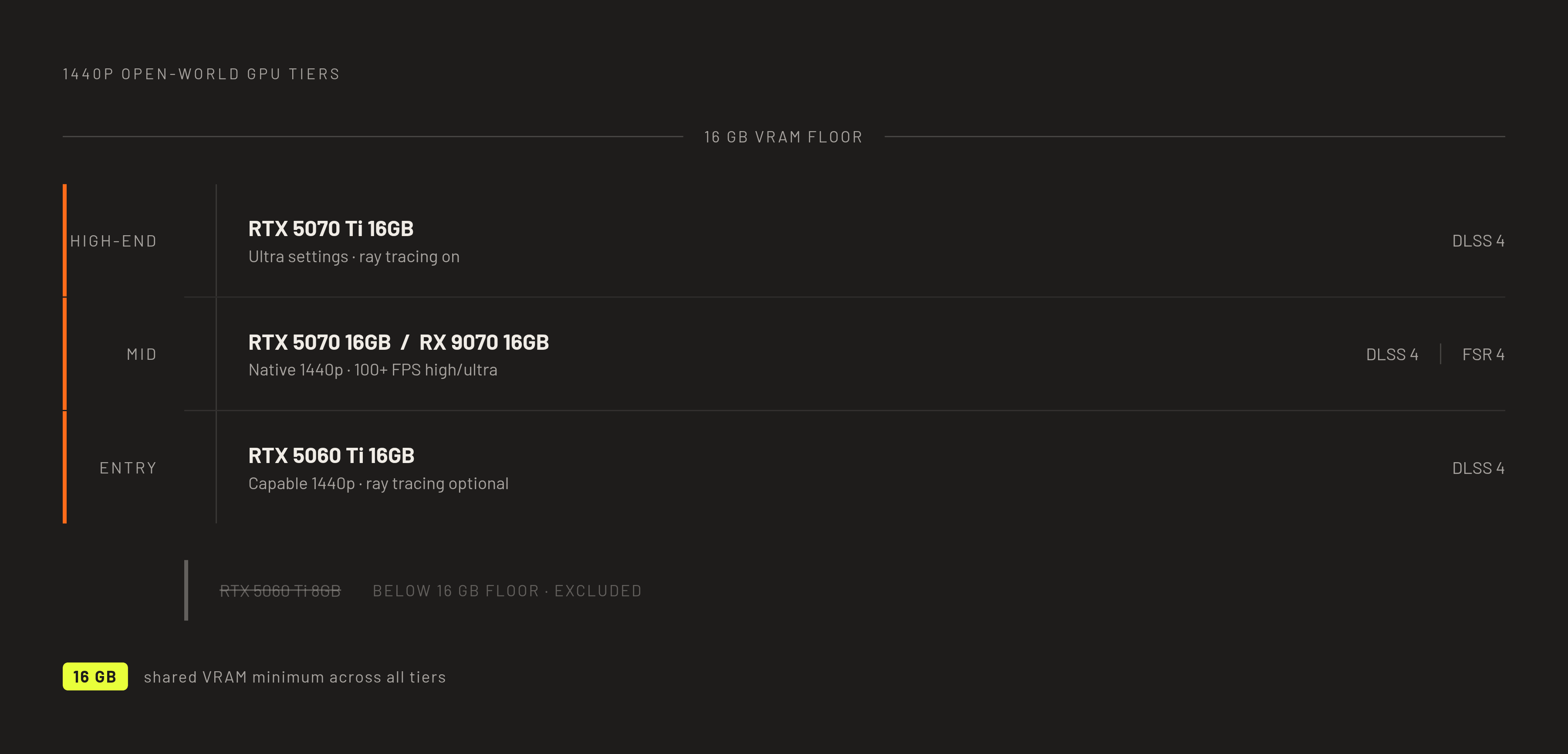
Upscaling (DLSS 4 and FSR 4) and GPU tier requirements
DLSS 4 and FSR 4 have changed what "GPU performance" means at 1440p. Frame generation is now part of how mid-range cards reach smooth frame rates in open-world titles, and the tier a builder needs depends partly on which upscaling ecosystem they're buying into. The two ecosystems aren't interchangeable. Full DLSS 4 features, including Multi Frame Generation, require an RTX 50 Series (Blackwell) GPU. Prior-generation RTX 40 cards still get DLSS 4's upgraded Frame Generation model, and every RTX card gains the transformer-based Super Resolution, Ray Reconstruction, and DLAA, but Multi Frame Generation stays exclusive to Blackwell. FSR 4 draws a similar line: it requires an RDNA 4 card from the RX 9000 series, and prior-generation AMD cards fall back to FSR 3 or earlier. If you buy a previous-generation card today, you won't get the upscaling performance that current benchmarks for that card tier advertise, because those benchmarks frequently use current-generation frame generation. DLSS still holds a raw frame-output edge over FSR, with deeper ray-tracing integration and more efficient Multi Frame Generation, but that gap has narrowed compared to prior generations, and for open-world single-player titles specifically, FSR 4 is a workable alternative. Game support isn't equal between the two: DLSS 4 upscaling covers a substantially larger library than FSR 4 at this point, and builders who play across many genres should weigh that difference carefully. Choosing between the RTX 5070 and the RX 9070 at the mid-range tier means choosing an upscaling ecosystem for the next several years, not just comparing two cards' raw output.
What the processor floor looks like in open-world games
Open-world games rank among the titles most likely to be CPU-bound even at 1440p, because the processor handles NPC behavior, traffic systems, physics simulation, and dynamic world events. Dense urban scenes in these games produce frame spikes that expose a weak CPU no matter how strong the GPU paired with it is. The CPU's job in an open-world title includes tracking thousands of simultaneous simulation threads, covering pedestrian behavior, traffic lane-changing, police AI, and dynamic weather events, with that load scaling with world density. So when you move from 1080p to 1440p, CPU load doesn't drop proportionally the way it does in non-simulation genres. The simulation thread count stays constant regardless of what resolution the GPU is rendering at. Six modern cores mark the practical floor. Quad-core CPUs run into consistent frame-pacing problems in dense open-world environments, but if you pair six cores on a current-generation architecture with a 5070- or 9070-class GPU, they can handle the simulation load without becoming the bottleneck. The Ryzen 5 9600X, a six-core Zen 5 chip, is the practical entry floor for a 1440p 144Hz build, handling the simulation load without pulling budget away from the GPU tier, where it matters more. AMD's 3D V-Cache chips, the Ryzen 7 7800X3D and Ryzen 7 9800X3D, carry a large L3 cache that cuts frame-time spikes in CPU-bound scenarios, and the 9800X3D does this especially well in dense open-world environments that plague older CPUs. HP's Gaming Hardware Guide 2026 frames CPU selection around matching the GPU tier to avoid bottlenecks, a sound way to think about balancing the system as a whole. At 1440p, the GPU does most of the rendering work, and the performance gap between an X3D chip and a cheaper six-core option often shrinks to a few frames in GPU-bound scenes. Open-world games are precisely the genre where CPU-bound scenarios occur even at 1440p, so if you play this genre heavily, the X3D cache is worth its premium, though it's not a blanket upgrade for every 1440p build.
RAM and storage floors in open-world games
Open-world games stream assets continuously, so RAM and storage speed become directly visible to the player, surfacing as texture pop-in, load stutter, and frame hesitation in ways most other genres never expose. HP's Gaming Hardware Guide 2026 recommends 32GB of DDR5 for mid-range gaming systems that target modern titles and want to future-proof, but it notes 16GB DDR5 covers most 1080p play and many 1440p games, so that's the minimum you need. Open-world titles load large volumes of world state, NPC data, and texture assets into system RAM all at once, and 16GB leaves too little headroom once the OS and any background applications are accounted for, producing stutter that looks unrelated to GPU or CPU performance but isn't. For an AM5 platform, DDR5-6000 CL30 in dual-channel configuration is the practical sweet spot, feeding the CPU's memory controller without paying a premium for speeds that return diminishing gains. Storage carries the same urgency. Open-world games rely on real-time asset streaming to build the world as you move through it, so drive read speed determines how quickly textures, models, and audio arrive; a slow drive produces pop-in that no GPU upgrade will fix. A mechanical hard drive can't sustain the sequential read throughput real-time world streaming demands. That is why an NVMe Gen4 SSD is now standard minimum advice across 1440p build guides. Capacity matters too: modern open-world titles carry large install footprints, and a 1TB drive fills quickly with two or three such titles plus the OS, so 2TB is the practical target for builders who want room to breathe. Windows 11's DirectStorage support adds another layer, accelerating asset decompression directly to the GPU and reducing CPU overhead during streaming, which is one more reason a modern OS paired with a fast NVMe drive belongs in the complete picture.
Three build tiers that meet the 1440p open-world floor, from entry to high-end
The component floors argued above resolve into three coherent build tiers, entry, mid-range, and high-end, each clearing the 1440p open-world bar in its own way and each representing a defensible value decision. The entry tier, running roughly $950 to $1,200, pairs a Ryzen 5 7600 or Ryzen 5 9600X with an RTX 5060 Ti 16GB, backed by 32GB of DDR5 and a 1TB NVMe Gen4 SSD. The Ryzen 5 9600X is the better pick of the two if the build is meant to last two years or more, since its Zen 5 architecture has better forward compatibility than the 7600's Zen 4. This build clears the six-core CPU floor, the 16GB VRAM floor, and the 32GB RAM floor, the three non-negotiables for open-world gaming at 1440p, while staying under $1,200. The trade-off is that the RTX 5060 Ti will need to drop from ultra to high in the most demanding open-world titles, and ray tracing is better treated as optional at this tier. The mid-range tier, roughly $1,200 to $1,500, pairs the Ryzen 5 9600X with either an RX 9070 (around $1,200) or an RTX 5070 (around $1,080 for the CPU and GPU together), backed by the same 32GB of DDR5 and 1 to 2TB of NVMe Gen4 storage. The RX 9070 earns the description "the true 1440p card" at this price point, while the RTX 5070 pairing is "dead-balanced at 1440p," with neither component waiting on the other. Both options clear the 16GB VRAM floor, the six-core Zen 5 simulation floor, and the RAM floor comfortably, making this the tier where 1440p open-world gaming runs natively. The high-end tier, around $2,000, combines a Ryzen 7 9800X3D, an RTX 5070 Ti 16GB, 32GB of DDR5-6000, a 2TB NVMe Gen4 SSD, and an MSI MAG B650 Tomahawk WiFi motherboard. This build is built around the 9800X3D's 3D V-Cache, which eliminates the traffic-driven frame spikes discussed earlier, so the RTX 5070 Ti can deliver smooth 1440p ultra with ray tracing enabled. The combination of DLSS 4 Multi Frame Generation and the 9800X3D's simulation headroom is what lets this build handle the next generation of open-world titles without a GPU upgrade, a claim corroborated by independent descriptions of comparably specced systems delivering "smooth 1440p Ultra with ray tracing." All prices here are approximate and will shift with retailer and timing. For any of these three tiers, BuildCores' 3D configurator lets a builder load components from its library of 5,000-plus models, run real-time compatibility checks covering GPU clearance, VRAM totals, and power requirements, compare prices across retailers, and see the finished build in three dimensions before buying a single part.
Cases and cooling choices that fit a 1440p open-world rig
A case chosen without checking GPU clearance and airflow can undercut an otherwise well-specced 1440p build. At the 250W-plus TDP levels of current mid-range and high-end GPUs, sustained thermal headroom affects real performance, not just how the build looks. GPU length is a hard constraint here: the RTX 5070 and 5070 Ti are large cards, and a case without at least 340mm of clearance may not fit the longest aftermarket versions, so that figure is worth confirming before any case purchase. Among cases that clear the bar, the Lian Li Lancool 216 offers 392mm of GPU clearance for roughly $100 to $110, and the Phanteks XT Pro Ultra offers 415mm of clearance for around $80. The choice beyond clearance comes down to airflow versus display. Mesh-front mid-towers such as the Corsair 4000D Airflow and the Lian Li Lancool 216 are built to sustain GPU thermals under load, while the Lian Li O11 Dynamic EVO, a dual-chamber mid-tower with a mesh front and tempered glass side panel, prioritizes component visibility and performs best paired with a 360mm AIO to manage heat in its more enclosed layout. The Fractal Design North, at roughly $155, is a third category: its wood-paneled front sets it apart from steel-and-glass designs, and it keeps a compact footprint with an adjustable mesh side-panel fan bracket, suiting builders who want a distinctive look on the desk without going full showcase. Cooling needs vary by chip. The Ryzen 5 9600X runs cool enough on a solid tower cooler, with the Thermalright Peerless Assassin 120 SE at around $30 serving as a workable example, and an AIO adds cost and complexity without a meaningful thermal gain for this chip. The Ryzen 7 9800X3D, carrying more simulation load in a high-end build, benefits from stronger sustained cooling, and a 240mm or 360mm AIO is the appropriate choice there. A 1440p open-world build running $1,200 to $1,800 represents a serious investment, and builders increasingly treat the case and lighting as part of the finished product. BuildCores' setup builder addresses the practical question of how a monitor, case, and peripherals will look together, letting a builder visualize the full desk environment before committing to an airflow-first or showcase-first design.
Where most builders stand today
Most active PC gamers don't yet run hardware that clears the 1440p open-world floor described above, but the upgrade wave underway confirms these thresholds. Recent Steam survey data show 16GB VRAM GPU configurations have overtaken 8GB as the most common VRAM configuration among Steam users, the first time that's happened in the survey's history, so this confirms the VRAM floor argued earlier reflects where the market is actually heading, not just a theoretical target. System memory tells the same story: 32GB RAM configurations have similarly overtaken 16GB as the most common memory configuration in recent Steam survey data, aligning directly with the 32GB floor described in the RAM section above. If you're still running an 8GB VRAM card, you won't just be stuck with lower settings. Some open-world titles now set 12GB as a stated minimum or show severe streaming stutter on 8GB cards regardless of other settings, making a move to 16GB increasingly a question of whether the game runs. BuildCores publishes monthly hardware surveys tracking what the community is actually buying, offering a continuously updated picture of real purchasing trends.
Prioritizing component floors and trade-offs when budget is tight
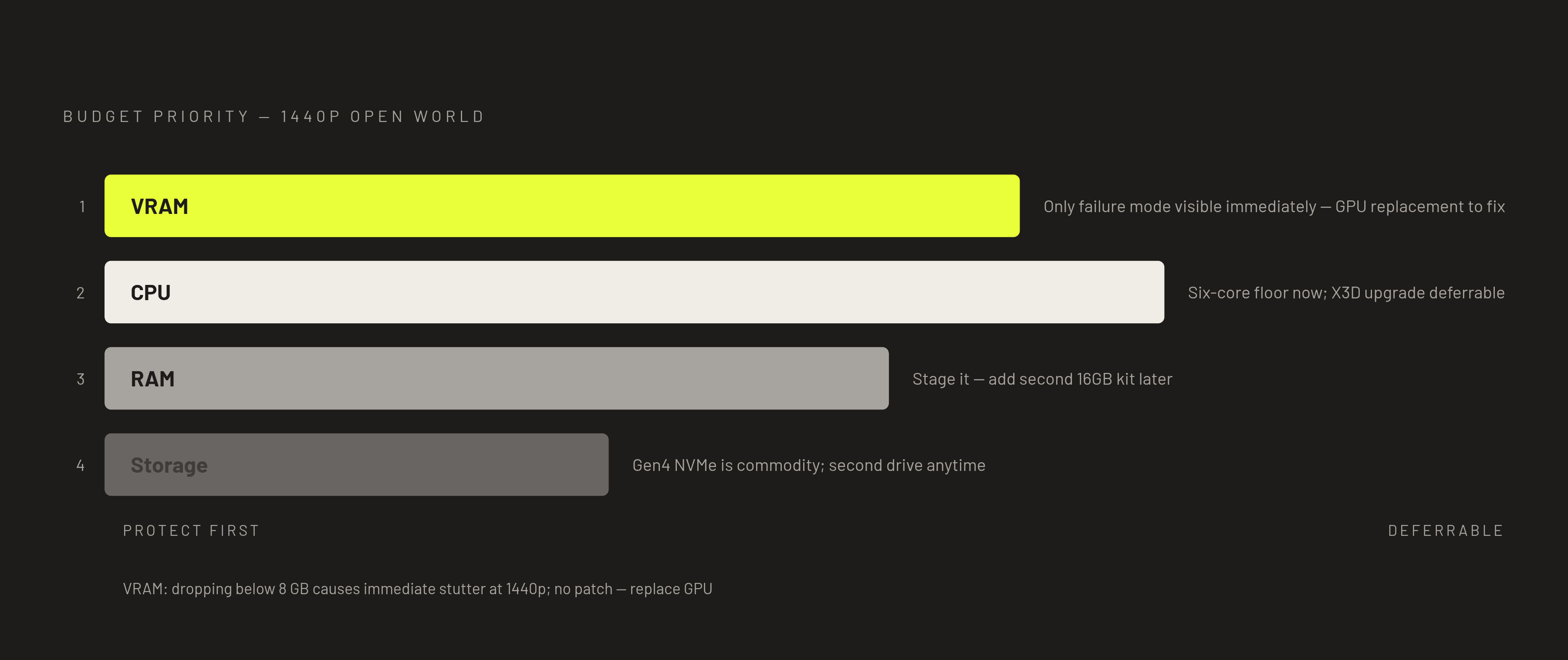
When a fixed budget can't meet every floor at once, the priority order should follow the bottleneck hierarchy open-world games actually expose: VRAM first, then CPU simulation headroom, then RAM, then storage speed, rather than the order components are typically listed on a spec sheet. VRAM is the first trade-off to protect. Dropping to 8GB to save money elsewhere produces a bottleneck that is visually obvious in texture quality and stutter and can't be fixed without replacing the GPU entirely, making it the one component floor where a compromise appears immediately and stays. CPU headroom comes second: a six-core current-generation chip is sufficient on its own, and the X3D upgrade, while worth its price for dedicated open-world builders, can be deferred if the budget needs to go toward the GPU tier first. RAM can be staged over time. A builder starting with 16GB and planning to add a second kit later can do so on most current platforms. The 32GB floor is the cheapest floor to reach after the build is already assembled. Storage is the easiest floor of all to meet, since Gen4 NVMe SSDs at 1TB now run at commodity pricing, and the move from 1TB to 2TB can happen anytime by adding a second drive. A system that clears the VRAM and CPU floors with a mid-range GPU and a value CPU often delivers better open-world performance than one pairing a high-end GPU with an underpowered CPU and 8GB of RAM, because the simulation bottleneck appears in exactly the scenes that matter most in this genre. BuildCores' real-time compatibility checker, multi-retailer price comparison, and FPS performance estimates let a builder test these trade-offs visually before spending anything, applying the prioritization laid out here interactively. Planning a build around a clear hardware floor, understanding why each threshold exists rather than just meeting it by coincidence, is what separates a system that holds up for two years from one that starts showing its age in the first open-world title released after the purchase.