Mid-Range $1500 Build for Streaming and Gaming
Balance CPU and GPU carefully to handle gaming and streaming simultaneously on this budget.

Summary
Balance CPU and GPU carefully to handle gaming and streaming simultaneously on this budget.
A $1,500 streaming and gaming PC needs more than the fastest graphics card the budget can cover. It needs enough CPU headroom to run the game, stream, and background apps at the same time. The strongest balance is a Ryzen 7 9700X with an RTX 5060 Ti 16GB, while builders who stream less often can shift more money toward gaming performance.
Why $1,500 buys less PC than it used to — and why that makes component choices matter more
The $1,500 tier still delivers real capability in 2026, but it buys meaningfully less than it did eighteen months ago. With SSD and DDR5 prices up, there is less money left for the processor and graphics card. That makes this a trade-off exercise that still requires quality supporting parts. Money spent in one place must come from another.
The upside is still substantial. This budget can deliver excellent 1440p gaming, capable 4K with upscaling, and enough headroom for simultaneous streaming. AMD has committed to AM5 socket support through at least 2027, giving a suitable motherboard value beyond the first CPU installed in it. With the right allocation, a machine at this tier can remain competitive through 2028–2029 on its initial platform.
Why streaming and gaming together demand a different set of priorities than a pure gaming build
A gaming-only PC has one main performance target. A streaming PC has to run the game while also encoding video for viewers, and those jobs can compete for the same resources. CPU-based x264 encoding puts a heavy load on the processor. A CPU that plays a game comfortably by itself can drop frames once encoding joins the workload.
NVIDIA’s NVENC changes that balance by handling encoding in a dedicated part of the GPU. The practical comparison is heavy processor use with x264 versus a much lighter encoding burden with NVENC. This leaves more CPU room for the game. It also makes the graphics card a dual-purpose purchase, because its gaming performance and encoder both shape the result.
Hardware encoding does not make CPU choice irrelevant. OBS, Discord, browser tabs, and the game still need room to run together. Eight cores are therefore a better target than six for regular streaming. There is also a platform caveat with AV1. Having an AV1 encoder does not, by itself, settle whether that format fits the streaming platform, so the card’s AV1 support should not be treated as a promise about every destination.
The GPU decision — RTX 5070, RTX 5060 Ti 16GB, or AMD RX 9060 XT
The RTX 5070 offers the strongest gaming performance of these three choices, with strong native 1440p performance and the best ray tracing hardware in the group. It includes 9th-gen NVENC AV1 encoding and DLSS 4 Multi Frame Generation in a growing game library. It also costs the most of the three. That price buys more gaming headroom, but leaves less money for the rest of the machine.
Its 12GB of GDDR7 is the other compromise. In demanding Unreal Engine 5 titles such as Gears of War: E-Day, that capacity can become a constraint, particularly with high-resolution textures and Frame Generation enabled. Builders aiming for demanding settings need to weigh both, rather than judging the card only by its position in the range.
The RTX 5060 Ti 16GB makes the stronger streaming-first case because it combines a larger memory buffer with the same generation of NVENC encoder at a lower price. The money saved can pay for a Ryzen 7 9700X instead of a Ryzen 5 9600X, or go toward better storage. Raw gaming performance is lower than the 5070’s, especially at higher resolutions and with heavy ray tracing.
The AMD RX 9060 XT 16GB is another good choice when getting more native gaming performance for the money matters most. Its 16GB buffer matches the 5060 Ti’s capacity, but its AV1 and H.264 encoding quality and efficiency do not match NVENC at equivalent bitrates, and its ray tracing performance is lower. For regular streaming at this budget, choose the 5060 Ti 16GB, while the 5070 suits a stronger gaming emphasis and the RX 9060 XT suits occasional streaming with savings reinvested elsewhere.
The CPU choice — why core count and platform count for more when streaming
The Ryzen 7 9700X is the primary CPU recommendation because its eight cores give the game, OBS, and background tasks room to coexist even when NVENC handles the encode. It also leaves scope for a faster GPU later. With a 65W TDP, the chip can use a quality tower air cooler without directing part of the budget toward an AIO.
The Ryzen 7 7800X3D makes a different argument. Its 3D V-Cache is tuned for gaming, making it attractive to builders who put frame consistency and low-percentile frame times first. The 9700X is the more balanced streaming-first choice, while the 7800X3D remains viable for less frequent streaming with NVENC taking on encoding.
The Ryzen 5 9600X is the lower-cost compromise. Its six cores leave more money for a stronger graphics card, but less room to run a demanding game and streaming software at the same time. It is workable for this workload. With AM5, all three choices leave room for an upgrade, as long as the motherboard can support it.
RAM, storage, and motherboard — straightforward choices that avoid expensive changes later
Start with 32GB of DDR5-6000 CL30 memory. A streaming rig has to hold more than the game alone, because OBS, Discord, and browser tabs share that memory while the session runs. At this tier, 32GB is the functional baseline. DDR5-6000 CL30 is the AM5 sweet spot, and faster kits cost more without doing much to improve gaming.
A 2TB Gen4 NVMe SSD is the sensible storage target. Modern AAA games regularly exceed 100GB each, and local recordings add demand that a gaming-only machine may not have. That leaves a 1TB drive short of space sooner in a streaming build. Gen4 is fast enough for this workload, and paying more for Gen5 does little to help with gaming or streaming.
A quality B650 or B650E motherboard anchors the upgrade plan. B650 is enough for a build based on Gen4, and B650E has PCIe 5.0 and multiple M.2 slots. Good power delivery deserves more attention than decorative extras because it supports a later CPU swap without replacing the board. Built-in WiFi 6E or 7 is also worth prioritizing when a wired connection is not practical.
PSU, case, and cooling — the foundation for quiet running and clean upgrades
A 750W 80+ Gold power supply with ATX 3.1 compliance is the right foundation here. A native 12V-2x6 connector keeps adapter cables from cluttering the inside of the case where they can be seen through the glass. The power supply needs to support the chosen parts while leaving room for the build to grow.
For the case, airflow comes before decoration. Gaming and encoding together create a sustained workload, so a mesh-front mid-tower makes more sense than choosing on appearance alone. The Phanteks XT Pro Ultra includes four 140mm DRGB fans, a glass side panel, and support for rear-connector motherboards. The Fractal Design North offers an airflow-focused mesh-and-wood front for builders whose case will be visible on stream.
Looks are a legitimate consideration in that setting. A streaming PC can be part of the picture, but its fan noise can become part of the audio too. The 9700X’s cooling needs are modest enough for a quality tower air cooler, so an AIO is unnecessary at this tier. Lower fan noise is especially useful with a desk microphone and limited acoustic treatment.
Two complete builds at $1,500 — streaming-first or gaming-first
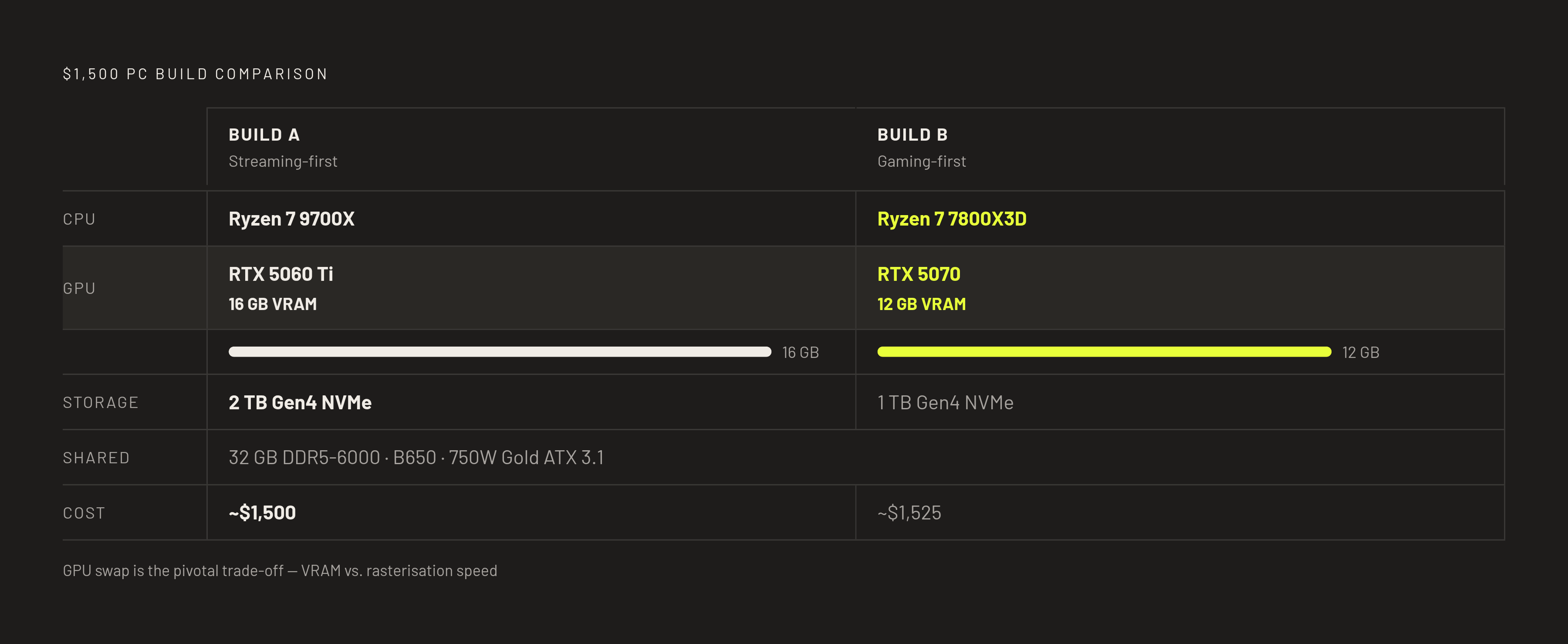
Build A puts the budget toward regular streaming. Its core pairing is the AMD Ryzen 7 9700X and NVIDIA RTX 5060 Ti 16GB, supported by an AM5 B650 motherboard with WiFi and 32GB DDR5-6000 CL30 memory. Storage is a 2TB Gen4 NVMe SSD. The other parts are a 750W 80+ Gold ATX 3.1 power supply, a Phanteks XT Pro Ultra mesh-front case, and a quality tower air cooler. This is the configuration for frequent streamers who want CPU headroom and NVENC quality without giving up solid 1440p gaming.
Build B shifts the emphasis toward gaming performance. It pairs the AMD Ryzen 7 7800X3D with the NVIDIA RTX 5070 12GB, using an AM5 B650E motherboard with WiFi and the same 32GB DDR5-6000 CL30 memory specification. Storage drops to a 1TB Gen4 NVMe SSD, but there are more M.2 slots to add storage later. A 750W 80+ Gold ATX 3.1 power supply, mesh-front airflow mid-tower, and quality tower air cooler complete the configuration. This is the option for primarily gaming at high-refresh 1440p, with entry 4K capability and occasional streaming.
Both configurations target the $1,500 tier. At the prices supplied, the build with the 7800X3D and 5070 costs around $1,525, so keeping it within a strict budget takes care. The cheaper 9600X mentioned earlier is a way to spend less on the CPU and keep the stronger GPU. Build B still has the 5070’s 12GB memory limit, while Build A’s 16GB buffer has more room for textures that need more than that.
What community hardware data says about this build’s place in PC gaming
The September 2026 Steam Hardware Survey found that 32GB overtook 16GB as the most common RAM configuration for the first time. That puts the recommended memory capacity in step with the install base’s direction. The same survey series showed 16GB VRAM GPUs overtaking 8GB in July 2026. Build A follows that shift without spending more on the graphics card than the full workload justifies.
Eight-core CPUs also hold the largest share of the Steam user base, extending their lead over six-core chips. Those patterns show what people use, but a part’s popularity alone does not make it the right choice. The full configurations sit meaningfully ahead of the median Steam user, even as individual specifications become common. That supports the 2028–2029 competitive target, but does not promise maximum settings in every future game.
How to visualize and verify the build before ordering a single part
Before ordering, use a 3D planning tool with compatibility checks to view the configuration as a whole. GPU clearance, airflow paths, cable routing, and visible lighting are easier to judge when the parts are shown together than when they are listed across a spreadsheet. A setup builder can bring the desk, monitor, and peripherals into that view to show how the whole streaming space fits together.
Real-time retailer comparisons serve a different purpose. They establish whether the chosen parts fit the budget on the ordering day using current retailer prices. FPS estimates through 3DMark integration can also give a sense of how games will run at the chosen resolution and with the chosen library, though they do not measure the full streaming session.