ATX vs Micro-ATX vs Mini-ITX Form Factor Tradeoffs
Smaller boards cost more to engineer and cool than you'd expect.

Summary
Smaller boards cost more to engineer and cool than you'd expect.
ATX, Micro-ATX, and Mini-ITX trade expansion room, cost, cooling space, and footprint against one another. The right choice follows from what the build needs. BuildCores can help make those tradeoffs visible before buying, but the starting point is simple. Pay for room you will use, or compactness you actually need.
Why form factor is the first decision, not an afterthought
A case that cannot close or a power supply that will not fit is an expensive way to discover a size mismatch. Motherboard form factor is the board’s physical size and mounting standard, and it affects more than the board itself. It limits compatible cases, available expansion slots, and memory capacity. The case chosen around it then constrains the cooler and power supply. Reversing that chain after buying can mean replacing major components.
BuildCores makes these cascading constraints visible through real-time compatibility checking, so builders can see which cases, coolers, and PSUs work with their motherboard choice. ATX, Micro-ATX, and Mini-ITX are all available on AMD AM5 and Intel LGA1851 platforms in 2026. The choice comes down to the expansion and cooling room the build needs, the space it must fit, and the budget.
What the three sizes physically allow and forbid
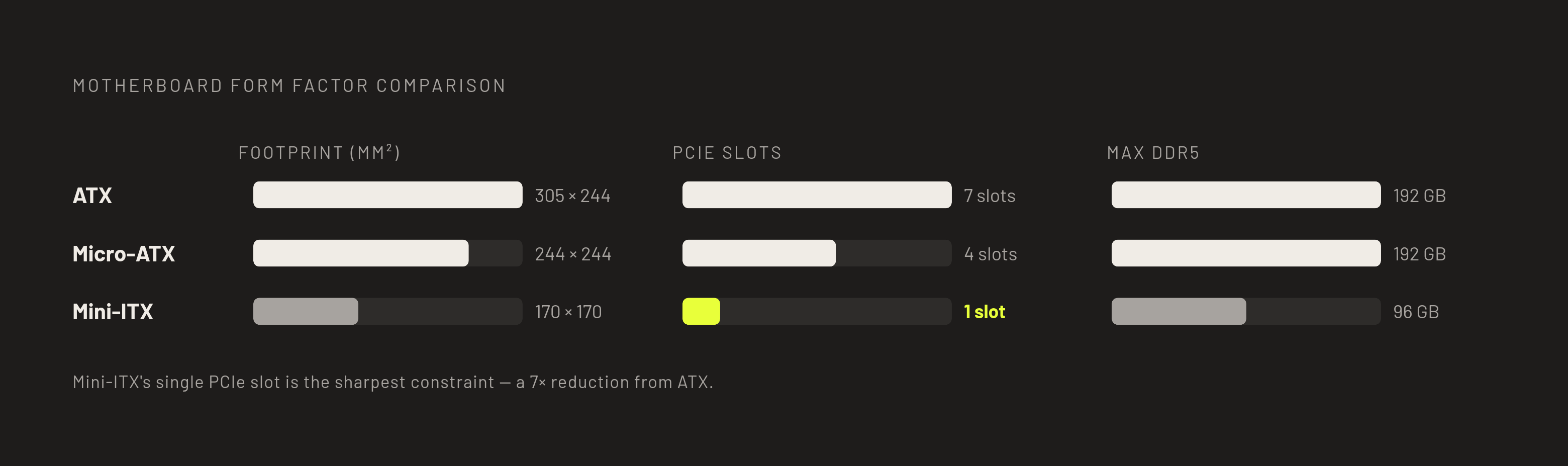
ATX measures 305 × 244 mm and allows up to 7 PCIe slots. Its four DIMM slots can support up to 192 GB DDR5 with 48 GB sticks on 2026-generation boards. Premium X870E and Z890 models have 14–20+ VRM power phases, which supply power to the CPU. Models with the full set of features have USB4, several USB 3.2 Gen 2 ports, and Wi-Fi 7 antenna connectors on the back.
Micro-ATX measures 244 × 244 mm and allows up to 4 PCIe slots. Most designs retain four DIMM slots, keeping the same dual-channel DDR5 capacity as ATX. Their 12–16 VRM power phases are sufficient for mainstream AMD Ryzen and Intel Core Ultra CPUs at stock settings. Micro-ATX boards fit compact mid-towers made to take them as well as standard ATX cases.
Mini-ITX measures 170 × 170 mm and has one PCIe x16 slot. Its two DIMM slots support up to 96 GB DDR5 with 48 GB sticks. Less board area constrains the VRM, so premium designs use high-current multi-layer power stages and active cooling fins. Compact Mini-ITX builds often need SFX or SFX-L power supplies, although some larger cases accept standard ATX units. A 3D view in BuildCores can show the board inside the chosen case, and its case-size comparison tool helps show how much space is around it.
The expansion headroom tradeoff, and who actually needs it
More slots are useful only if something needs to occupy them. The old gaming argument for ATX expansion has largely disappeared because multi-GPU SLI and CrossFire setups are obsolete for modern gaming. In most gaming builds, the second and third PCIe slots stay empty. A system with one GPU, one or two NVMe drives, and a DDR5 memory kit falls comfortably within Micro-ATX’s practical scope. For that builder, fewer slots make no difference in daily use.
Mini-ITX draws a harder line because the GPU occupies its only PCIe x16 slot. That slot has the same electrical bandwidth as the GPU slot on an ATX board, but there is no second slot for another card. Its 96 GB memory ceiling is also irrelevant for gaming but can matter for video editing or large local AI inference tasks. ATX’s extra slots are useful for internal capture cards, 10GbE network cards, dedicated audio processors, and M.2 add-in cards that add more NVMe storage. The builders who genuinely need that headroom are content creators, heavy streamers, and workstation users with those expansion requirements.
Why the cost relationship between the three sizes is counterintuitive
A smaller motherboard should cost less. That assumption works for Micro-ATX, but it breaks down with Mini-ITX. Fitting a full platform feature set into a 170 × 170 mm board requires denser, more expensive engineering. That extra cost can make a Mini-ITX board more expensive than an ATX board with the same features, even with fewer slots. ATX spans the widest price range, while Mini-ITX starts above Micro-ATX’s entry point and reaches prices that rival ATX.
The board is also only part of the bill. Mini-ITX builds often need SFX power supplies, which cost more than ATX units of the same kind, and small cases cost extra too. Comparing complete configurations in BuildCores, with the case, PSU, and cooler shown together, makes that cost relationship concrete. Micro-ATX is the clean value choice because an equivalent board costs less than ATX while most designs retain four DIMM slots and fit standard ATX cases.
How thermal density changes the stakes for Mini-ITX and high-TDP CPUs
The same density that raises Mini-ITX’s price also makes cooling more demanding. Less board area leaves less room for VRM heatsinks. A smaller case also has less room for airflow paths and radiators, and less space between fans. For a builder who needs only one GPU slot, this thermal problem can matter far more than the lost expansion slots. With a high-TDP CPU, the choice of case and cooler matters even more.
ATX offers the most room for power delivery and heatsink coverage, which becomes a real advantage in extreme overclocking. Micro-ATX is still enough for mainstream AMD Ryzen and Intel Core Ultra processors at stock settings. Its gap against ATX matters at the performance ceiling of flagship CPUs under sustained all-core load. Mini-ITX demands more deliberate thermal planning, but it is not inherently condemned to worse performance. Mesh panels, a clear GPU exhaust path, and the right cooler can make its thermal performance competitive.
How case selection determines whether a form factor's tradeoffs are acceptable
Cooling makes the case a co-decision with the motherboard. The planned build will fit and cool as intended if the case has enough internal space and GPU clearance and suitable fan positions. Fractal Design’s Torrent illustrates the room available in an ATX mid-tower. It ships with 2 × 180mm + 3 × 140mm fans and supports GPUs up to 461mm and 360mm front radiators. That space gives large components and airflow room that compact enclosures must allocate more carefully.
Micro-ATX cases show how much flexibility remains below ATX size. Corsair’s 2500D Airflow supports Micro-ATX and Mini-ITX boards, GPUs up to 400mm, and two 2.5-inch and two 3.5-inch drives. NZXT’s H3 Flow has ultra-fine steel mesh panels, 280mm front radiator support, and Micro-ATX back-connect motherboard compatibility. Its GPU clearance changes with the cooling layout, from 377mm without front fans to 352mm with front fans and 317mm with a front radiator and fans.
Mini-ITX cases make those space allocations even more explicit. Fractal Design’s Terra has a 10.4L volume, a walnut front panel, aluminum side panels, and an adjustable central spine separating the GPU/PSU and CPU zones. It accommodates GPUs up to 322mm in the larger configuration, while NZXT’s H2 Flow pairs a hybrid glass-mesh front panel with GPU clearance to 331mm. Cooler Master’s NR200P MAX comes with a 280mm AIO cooler and an 850W SFX power supply. Bundling these two needed parts helps with some of the cost and hassle of a small build and saves having to choose each one separately.
The portability and footprint dividend that only Mini-ITX delivers
The strongest reason to accept Mini-ITX’s compromises is the space it gives back. A fully built Cooler Master NR200P or Fractal Design Terra weighs 6–9kg, compared with 12–18kg for an ATX mid-tower. That difference matters when carrying a system to a LAN venue or moving it regularly. The NR200P’s 18.25L volume and the Terra’s 10.4L volume also allow placements a mid-tower prevents. The space on a desk, in a small apartment, or in a living room setup can make a small case a need.
Some builders are buying a system that belongs beside a monitor. The same logic applies to a compact machine for local AI inference, provided its memory and expansion limits fit the workload. Gaming performance is not inherently reduced because Mini-ITX uses the same platforms, CPUs, and GPU PCIe x16 connection as larger boards. Differences under sustained load come from cooling choices and case airflow, so compactness can be the benefit without performance loss being an automatic penalty.
Visualizing the build before committing to a form factor
GPU clearance, cooler height, PSU size, and cable routing all draw on the same space, so they need to be planned together. BuildCores has a 3D configurator that shows how the chosen parts look together in a build. Its real-time compatibility checking catches mismatches such as an ATX motherboard selected for a Micro-ATX case or an unmet SFX PSU requirement. Spec sheets remain useful for exact limits, while visualization helps show how those limits interact.
The configurator also compares prices across retailers, so Micro-ATX and Mini-ITX builds with the same features can be priced as whole systems. Its 3DMark integration supplies FPS performance estimates, adding a performance model to the size and cost comparison. For a build intended to sit in view, the setup builder extends the visualization to the full desk. BuildCores OpenDB is the source of the community-driven parts data behind these tools, with specifications and 3D models for new boards and cases as they are added. Together, these tools turn a general preference for a size into a specific configuration that can be examined before buying.
A decision framework that maps build goals to form factors
Start by identifying the actual expansion requirement, the space available for the case, the CPU’s TDP and any overclocking plans, and how often the system will move. Those answers establish which compromises are acceptable. Then pick the case first and match the motherboard size to it.
Choose ATX when the GPU must share the system with more than one PCIe add-in card. It also makes sense for a flagship high-TDP CPU pushed near its overclocking ceiling, where maximum VRM headroom matters. Storage-heavy systems with four or more NVMe drives are another reason to favor its expansion room. A large glass-panel mid-tower with visible cable routing and RGB can also be a deliberate goal. In each case, the extra space has a defined job.
Choose Micro-ATX for a GPU-primary build with one or two NVMe drives and a mainstream to upper-mid CPU. That is enough for most gaming and many content creation builds, without the cost of expansion slots that go unused. If budget is tight, savings over ATX can go toward a faster GPU or CPU. Its compatibility with compact mid-towers and standard ATX cases preserves enclosure choice. Four-DIMM designs also retain up to 192 GB DDR5 capacity when Mini-ITX’s 96 GB ceiling would become a constraint.
Choose Mini-ITX when the machine must fit a certain small space, sit comfortably on a desk, or travel often. Its premium is rational when those benefits are requirements and the single expansion slot is enough. A CPU in the 65W–105W TDP range suits a small build, while a higher-TDP chip needs more care in choosing the case and cooler. No form factor is best apart from the job it must do. Test the resulting case, motherboard, cooling, and price combination in the BuildCores configurator before buying.

