Understanding Motherboard VRM Quality for Overclocking and High-TDP CPUs
Power delivery and cooling matter more than phase count when matching a board to your CPU.

Summary
Power delivery and cooling matter more than phase count when matching a board to your CPU.
Choosing a motherboard for a high-TDP or overclocked CPU means looking past the headline phase count. VRM quality comes from power capacity and cooling working together. A board with enough of both lets the processor sustain its performance, while an underspecified board can quietly hold it back, even when the CPU cooler is doing its job.
What a VRM actually does and why it sits between your CPU and its potential
A Voltage Regulator Module, or VRM, takes the 12V from the power supply and turns it into the roughly 1.0–1.4V the CPU needs. It is a multiphase buck converter, which lowers the voltage through several power circuits that work together. As the processor’s demand changes, the VRM corrects its output in microseconds. Its job is not simply to supply power, but to keep that supply stable as the load shifts.
The circuits rely on a PWM controller, MOSFETs, chokes, and capacitors. The controller sets the voltage to be delivered, while the MOSFETs quickly switch the incoming power on and off. Chokes smooth that pulsing output into a steady current, and capacitors store and release energy to keep voltage stable. Multiple phases divide the electrical load and the heat rather than leaving one set of components to carry everything. If the VRM overheats, generally around 100°C, the motherboard forces the CPU to reduce its clock speeds to prevent damage, regardless of how capable the CPU cooler is.
Why phase count alone is a misleading way to evaluate a VRM
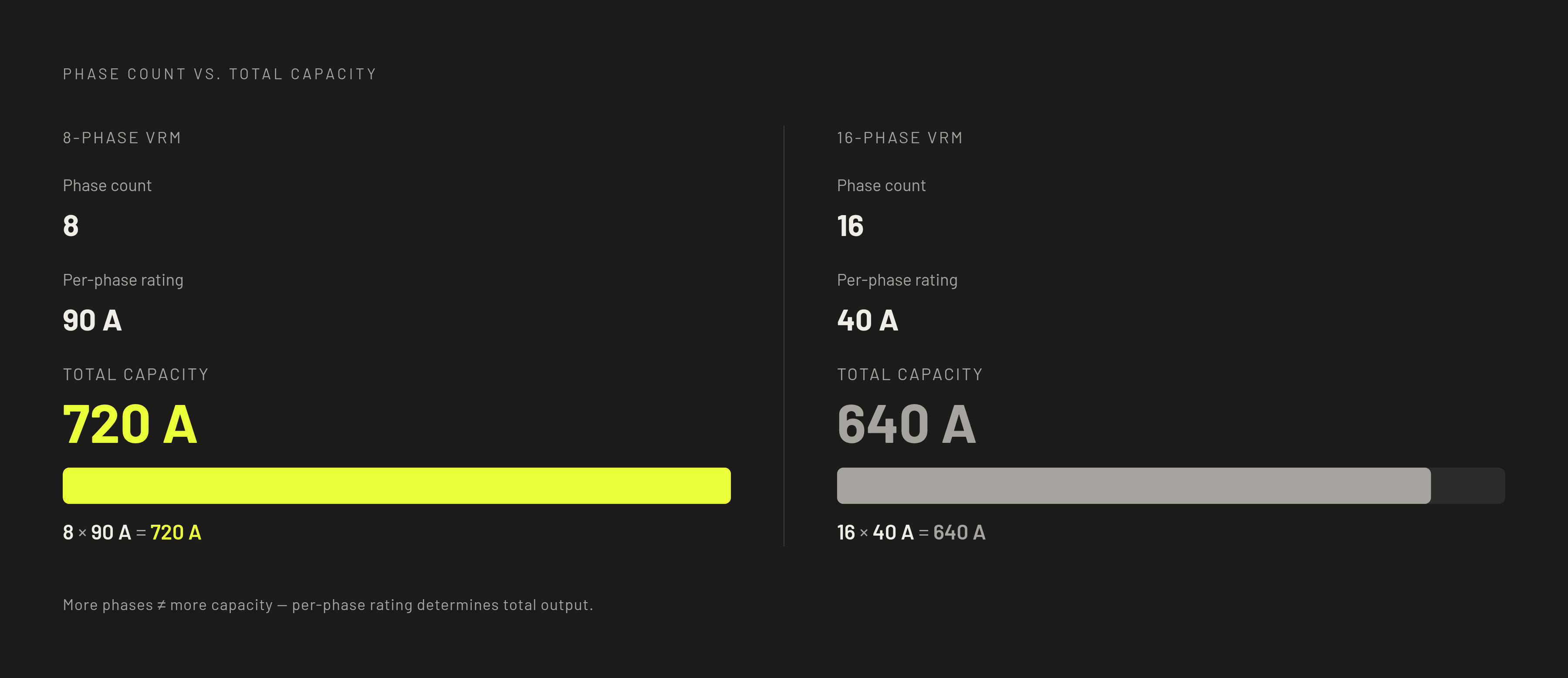
More phases do not automatically mean more capable power delivery. Compare an 8-phase design rated at 90A per phase with a 16-phase design rated at 40A. The first has more total amperage capacity despite having half as many phases. That inversion is why the number on the box cannot settle the comparison. Multiplying the CPU-dedicated phase count by the per-phase amp rating provides a useful starting point.
Even that calculation needs a clear account of what the manufacturer is counting. A board advertised as “16-phase” may use 8 true phases with doublers or count twice the components per phase. On a directly comparable basis, 12 CPU phases with 80A stages provide up to 960A of rated capacity, while 20 with 110A stages provide up to 2,200A. Whether the board can sustain those capacity figures depends on its thermal environment.
Among current AM5 and LGA1851 boards, mainstream B850 and B860 designs have ratings of about 50–110A per phase and often have small heatsinks. Enthusiast X870E and Z890 designs often have 80–110A stages and more cooling hardware. Integrated DrMOS and Smart Power Stage designs give off less heat for each watt they deliver than discrete MOSFET setups, and Smart Power Stages also send real-time telemetry to the controller.
How VRM thermals translate into actual CPU performance loss
A weak VRM usually causes reduced performance, with crashes less common. In games, that can mean sudden frame rate dips and uneven frame pacing. The average FPS from a brief run may therefore miss the problem that makes a longer session feel rough. Heat builds up slowly, so a short benchmark can end before the board gets too hot.
Sustained multi-threaded work is less forgiving because it keeps demanding power. Video encoding, simulation, and compilation can expose limits that intermittent gaming loads do not. A board that gets through a 10-minute game benchmark may be unable to sustain full performance over two hours of all-core work. That is the practical cost of buying an expensive processor and saving too aggressively on the board beneath it.
Cooling the VRM also requires more than attaching a heatsink. Tower coolers and AIOs can direct airflow away from the socket area, leaving the VRM dependent on case airflow. Give that area a working airflow path rather than assuming the CPU cooling system covers it. A heatsink in a dead zone can still approach its thermal limit.
How Intel and AMD differ in what the motherboard chipset is allowed to do
On Intel, chipset choice sets a limit before VRM quality enters the discussion. CPU multiplier overclocking requires a Z-series chipset, so a strong VRM on a B-series board does not unlock that option. Power delivery still matters for sustaining demanding stock workloads. If manual CPU overclocking is the goal, permission and capacity are separate requirements.
AMD gives builders broader access to tuning. Precision Boost Overdrive, or PBO, and Curve Optimizer are available across X870E, X870, and X670E boards, as well as B850 and B650 models. A well-built B-series board can therefore tune a high-end Ryzen CPU as effectively as an expensive X-series board. That flexibility makes the individual board’s power delivery more important. Even when the chipset allows a setting, the VRM still needs enough capacity to keep up with the load that setting puts on it.
Matching VRM specification to CPU class and use case
VRM adequacy is a relationship between sustained CPU demand, available amperage, and cooling. For an entry-class processor around 65W TDP, such as a Ryzen 5 or non-K Core i5, a 6–8 phase VRM with basic aluminum heatsinks is sufficient for stock operation and mild memory tuning. A board that supports a CPU on paper may still lack the power-delivery headroom it needs. A budget board that suits a low-power chip is not automatically a good match for a TDP-unlocked or high-core-count processor.
For gaming CPUs up to 125W TDP, look for 10–14 phases with 60–70A DrMOS stages and substantial heatsinks. That is a sensible target for AMD PBO and memory overclocking without sustained thermal stress. It provides a more useful buying framework than treating every gaming build as a flagship build. The heat still needs a way out, even when the board is rated to supply enough power.
For Ryzen 9, Core i9, and Core Ultra 9 builds in the 125–170W+ TDP class, the stronger target is 16+ phases with 80–110A Smart Power Stages. Heatpipe-equipped heatsinks and an 8+8 pin CPU power connection belong in that specification. Around 900A of total capacity is a practical minimum benchmark for flagship-class processors, alongside an evaluation of cooling. Boards without VRM heatsinks are unsuitable above low-power CPU classes even when their phase count looks adequate.
Boards that demonstrate these principles in practice across chipset tiers
The ASUS ROG Crosshair X870E Hero shows what an elite AM5 power-delivery design looks like. Its 18+2+2 configuration has 110A Smart Power Stages and a heatpipe-equipped heatsink that covers the whole power-delivery area. USB4, WiFi 7, and five M.2 slots add features, but they are separate from the reason its VRM stands out.
The GIGABYTE X870 AORUS Elite WIFI7 offers strong AM5 power delivery in a less extreme board. It has a 16+2+2 configuration and sits in the mid-to-upper tier capable of supporting flagship Ryzen processors without the top-tier ROG premium. DDR5-8200 support, WiFi 7, and a five-year warranty round out its specification. Further down the range, the GIGABYTE B650 AORUS Elite AX suits Ryzen 7-class processors with PBO enabled. Its VRM can also handle flagship-level loads, though flagship overclocking headroom may be limited.
The ASRock Z890 Taichi Lite illustrates why feature count and VRM quality need separate judgments. Its six full-speed M.2 slots and WiFi 7 provide clear features to weigh, but its VRM cooling is a weaker point relative to its price. The board’s other merits still matter, but choosing it for a demanding CPU requires a separate assessment of power-delivery cooling.
Why most mainstream builders are adequately served — and where the real risk sits
Most builders do not need an elite VRM. The majority of mainstream and enthusiast AM5 and LGA1851 boards can deliver full performance from most processors at stock settings. For those combinations, extra power capacity may offer headroom without changing the performance available today. Avoiding a mismatch matters more than buying the largest specification possible. VRM quality becomes decisive at the extremes.
Pairing an entry-level board with minimal cooling and 40–50A stages with a flagship or high-core-count CPU poses the clearest risk. Sustained multi-threaded work makes that mismatch harder to hide, while poor case airflow reduces the cooling margin further. PBO and manual overclocking can also move a previously comfortable pairing closer to its limits. For gamers, a marginal design can lose consistency during a long session even when a short benchmark looks normal.
What the Zen 6 platform shift means for VRM decisions builders are making now
AMD has said that Zen 6 will stay on AM5, so a motherboard bought now may serve beyond its first CPU. AM5, also known as socket LGA 1718, remains the platform, so a board bought now may later be asked to power a higher-core-count Ryzen processor. The VRM headroom a board has now could thus matter for a later 16-core or 24-core upgrade. It does not establish that every current board will support every future chip.
The outlined move takes the CCD from 4nm N4X to TSMC N2P at 2nm, and the I/O die from 6nm N6 to TSMC N3P at 3nm. With the expected gains in efficiency, each core can do more work while using less power. AMD’s stated intent is to stay in similar TDP ranges despite higher core counts, but that intent is not a finalized TDP specification. Entry-level B650 boards may have a harder time keeping up if the top flagship chips need more power.
Actual compatibility depends on vendor BIOS updates, and boards with smaller flash storage have already encountered space constraints. Buyers who plan to upgrade later should check the board revision and BIOS chip size as well as the AM5 label.
How to read a motherboard spec sheet for VRM quality before buying
Start with the CPU-dedicated phase count, which is the first number in a configuration such as “16+2+2.” Before comparing boards, check whether the advertised count is for true phases or a doubled arrangement. Then find the amperage of each phase and work out the total capacity the same way for each board. For a flagship-class CPU, compare that figure with the 900A benchmark while keeping the thermal design in view.
Next, identify the power stages and the hardware that cools them. DrMOS or Smart Power Stage designs are preferable to discrete MOSFET arrangements. Look for large aluminum heatsinks, direct-contact heat pipes on high-end boards, and high-conductivity thermal pads. Decorative plastic around the socket is not a substitute for a VRM heatsink. The board needs both a way to absorb heat and case airflow to carry it away.
An 8+8 pin configuration provides headroom for flagship and overclocked CPUs, while a single 8-pin connection is a potential constraint in a high-TDP build. Intel multiplier overclocking needs Z-series, while AMD allows tuning on more chipsets, so it is especially important to check each board. Carry those specifications into a 3D build plan to visualize the layout and assess the airflow around the socket before purchase. The buying decision is complete only when the CPU’s demand, the board’s power delivery, and the case’s cooling fit together.

